
Your Website Is Not a Brochure
Most business websites look great but do not generate leads. They have polished visuals, clever copy, and a "Contact Us" page buried three clicks deep. That is a digital brochure, not a lead generation machine.
A lead generation machine is a website deliberately engineered to guide visitors toward a specific action - booking a call, requesting a quote, downloading a resource, or starting a trial. Every page has a job. Every element serves conversion.
Here is how to transform your existing website into one that consistently delivers qualified leads to your sales team.
1. Define Your Conversion Goals (Before Touching Anything)
Before making a single change, answer these questions:
- Who is your ideal visitor? What role, industry, and company size?
- What action do you want them to take? Book a demo? Request a quote? Download a guide?
- Where are they in the buying journey? Just researching? Comparing options? Ready to buy?
Action step: Map out 2-3 conversion paths based on visitor intent level: low-intent (content download), medium-intent (webinar/assessment signup), and high-intent (demo/consultation request).
2. Fix Your Homepage in 5 Seconds
Research consistently shows that visitors decide whether to stay or leave within 5 seconds. Your homepage needs to answer three questions instantly:
- What do you do? (Clear headline, not clever wordplay)
- Who is it for? (Your target audience should see themselves)
- What should I do next? (One clear call-to-action)
What kills homepage conversion
- Vague headlines like "Innovative Solutions for Tomorrow" (what does that mean?)
- No visible CTA above the fold
- Auto-playing videos that slow load time
- Slider carousels (they reduce engagement - static hero sections outperform them every time)
- Navigation with 10+ menu items creating decision paralysis
What drives homepage conversion
- A specific, benefit-driven headline: "We Build AI Tools That Cut Your Support Costs by 60%"
- A single, prominent CTA button with action-oriented text: "Get Your assessment" beats "Learn More"
- Social proof immediately visible: client logos, results metrics, or a brief testimonial
- Fast load time (under 2.5 seconds on mobile)
Quick win: Replace your homepage headline with a specific, measurable benefit statement. This single change can improve conversion rates by 10-30%.
3. Build Landing Pages That Convert
Your homepage serves many audiences. Landing pages serve one audience with one offer. Every marketing campaign - paid ads, email campaigns, social media promotions - should point to a dedicated landing page, not your homepage.
Anatomy of a high-converting landing page
- Headline that matches the ad or link that brought them here (message match reduces bounce rates by 30-40%)
- Subheadline explaining what they get and why it matters
- 3-5 bullet points listing specific benefits (not features)
- Social proof - testimonials, case study snippets, trust badges
- A single form - only ask for fields you actually need
- No navigation menu - remove distractions, keep them focused on the one action
Form optimization
Every additional form field reduces completion rates by roughly 10%. If you are asking for name, email, phone, company, role, budget, timeline, and a message - you are losing 70%+ of potential leads before they finish.
For top-of-funnel offers (ebooks, guides): Name + Email only. For mid-funnel offers (webinars, assessments): Name + Email + Company. For bottom-funnel offers (demos, consultations): Name + Email + Company + brief project description.
4. Create Content That Captures Leads
Blog posts, guides, and resources serve two purposes: they attract organic search traffic, and they give you something valuable to offer in exchange for contact information.
The content-to-lead pipeline
- Write blog posts that rank for problems your buyers search for. If you sell AI automation, write about "how to reduce customer support costs" or "invoice processing automation."
- Create a gated resource related to each blog topic. The blog post gives 80% of the value for free. The gated resource (checklist, template, detailed guide) gives the remaining 20% in exchange for an email.
- Place contextual CTAs within and after each blog post. Not generic "Subscribe to our newsletter" - specific, relevant offers: "Download the AI Automation ROI Calculator."
Content formats that generate the most leads
| Format | Conversion rate | Best for |
|---|---|---|
| ROI calculators / assessments | 15-25% | Bottom-funnel prospects |
| Templates and checklists | 10-20% | Mid-funnel prospects |
| Industry reports / benchmarks | 8-15% | Top-funnel prospects |
| Webinar registrations | 5-12% | Mid-funnel prospects |
| Newsletter signups | 1-3% | Broad audience building |
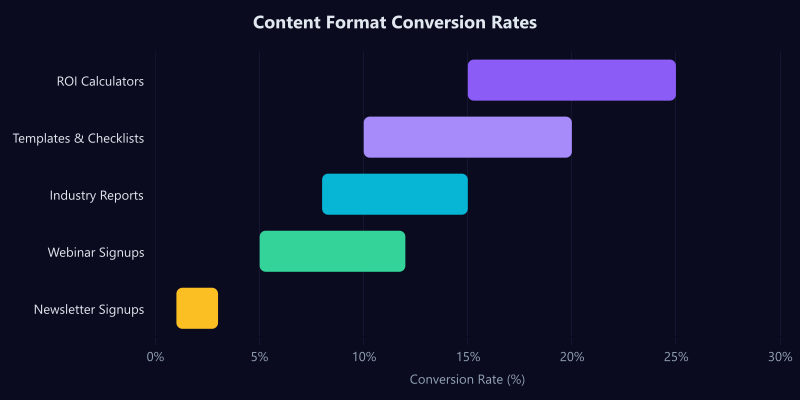
Focus on the formats that match your audience. B2B buyers respond well to calculators, templates, and benchmarks. B2C audiences prefer quizzes, checklists, and exclusive content.
Want us to audit your website's conversion potential? Get a website conversion audit - we will analyze your current site and identify the specific changes that will generate more leads.
5. Optimize Your Calls-to-Action
The difference between a website that generates 5 leads per month and one that generates 50 often comes down to CTA placement and copy.
CTA placement rules
- Every page needs at least one CTA. If a page does not ask the visitor to do something, it is a dead end.
- Place CTAs where attention is highest: immediately after the hero section, at natural content breaks, and at the bottom of every page.
- Use sticky CTAs on mobile. A fixed bottom bar with your primary CTA keeps conversion accessible while scrolling.
- Exit-intent popups still work - but only if the offer is genuinely valuable and the popup is not annoying.
CTA copy that converts
Weak: "Submit" / "Learn More" / "Click Here" Strong: "Get My assessment" / "See Pricing" / "Book a 15-Minute Call"
The best CTAs are specific about what happens next and use first-person language ("Get My Free Guide" outperforms "Get Your Free Guide" by 20-30% in most A/B tests).
6. Speed Up Your Site
Page speed directly impacts lead generation. Google research shows that as page load time increases from 1 second to 3 seconds, bounce probability increases by 32%. At 5 seconds, it jumps to 90%.
Quick speed wins
- Compress and lazy-load images. Use modern formats (WebP, AVIF) and serve appropriately sized images for each device.
- Minimize JavaScript. Audit your third-party scripts - analytics, chat widgets, tracking pixels. Each one adds load time. Remove anything you are not actively using.
- Use a CDN. Serve static assets from edge servers close to your visitors.
- Enable caching. Set proper cache headers so returning visitors load instantly.
- Choose a modern framework. Server-side rendered frameworks like Next.js deliver dramatically faster initial page loads than client-side-only React apps.
7. Add Live Chat or a Chatbot
Visitors who engage with chat are 2.8x more likely to convert than those who do not. A chat widget gives visitors an immediate path to answers without filling out a form or making a phone call.
Options by budget
| Budget | Tool | Capabilities |
|---|---|---|
| Free | Tawk.to | Fully free live chat with basic chatbot capabilities |
| Mid-range | Tidio or Intercom Starter | AI chatbot with live agent handoff |
| Custom | Purpose-built AI chatbot | Trained on your knowledge base, qualifies leads, books meetings automatically |
8. Implement Trust Signals
People buy from businesses they trust. Your website needs to establish credibility quickly, especially if visitors have never heard of you.
Trust signals that move the needle
- Client logos (even 3-4 recognizable names make a difference)
- Specific results ("Increased organic traffic by 340% in 6 months" beats "We deliver great results")
- Testimonials with names, photos, and company names (anonymous testimonials have almost zero impact)
- Case studies with measurable outcomes
- Security badges and certifications relevant to your industry
- Google reviews or third-party review platform ratings
9. Set Up Analytics and Tracking
You cannot optimize what you do not measure. At minimum, track these metrics:
- Conversion rate by page - which pages generate leads and which are dead ends?
- Conversion rate by source - which traffic channels produce the highest-quality leads?
- Form abandonment rate - are people starting but not finishing your forms?
- Time to conversion - how many visits before someone converts?
- CTA click-through rate - which CTAs get clicked and which get ignored?
The Lead Generation Checklist
Use this as a quick audit of your current website:
- Homepage communicates what you do, for whom, and what to do next within 5 seconds
- Every page has at least one clear call-to-action
- CTA copy is specific and action-oriented (not "Submit" or "Learn More")
- Forms ask for the minimum fields necessary
- Landing pages exist for key campaigns (separate from homepage)
- Blog content targets problems your buyers search for
- At least one gated resource exists for lead capture
- Page load time is under 2.5 seconds on mobile
- Trust signals appear near conversion points
- Analytics track every conversion event
- Chat widget or chatbot is available for immediate engagement
Start With One Thing
Do not try to implement everything at once. Pick the single change that addresses your biggest gap:
- No leads at all? Fix your homepage headline and add a prominent CTA.
- Traffic but no conversions? Build a dedicated landing page with a compelling offer.
- Leads but low quality? Refine your forms and add qualification questions.
- Slow site? Optimize images and remove unused scripts.
Let us audit your website and identify your biggest conversion opportunities - free, no obligation, and you will walk away with a clear action plan.
Frequently Asked Questions
What is a lead generation website? A website specifically designed to convert visitors into contacts through forms, calls, and chat.
How many leads should my website generate? A well-optimized site converts 2-5% of visitors into leads, depending on industry and traffic quality.
What is the best lead magnet for service businesses? Free consultations, audits, or guides work best because they demonstrate expertise with zero risk.
Do I need to redesign my site for better leads? Not always. Strategic changes to CTAs, forms, and page layout can significantly improve conversions.
How do I track website leads? Use Google Analytics 4 conversion events, call tracking software, and CRM integration.