Your Website Is Your Most Important Business Asset
Your website works 24/7. It is your storefront, your salesperson, your credibility signal, and your lead generation machine - all in one. Yet most small businesses treat web development as a one-time expense rather than an ongoing investment.
Whether you are building your first site, redesigning an outdated one, or adding functionality to an existing platform, understanding what web development services include - and what they should cost - is essential to making a smart investment.
Types of Web Development Projects
1. New Website Build
Starting from scratch. This includes strategy, design, development, content, and launch.
Timeline: 4-12 weeks depending on complexity Cost range: $3,000-$50,000+
What it includes:
- Discovery and strategy (understanding your business, audience, and goals)
- UX/UI design (wireframes, mockups, responsive layouts)
- Frontend development (what users see and interact with)
- Backend development (databases, forms, integrations)
- Content creation or migration
- SEO setup (meta tags, site structure, page speed optimization)
- Testing and quality assurance
- Launch and post-launch support
2. Website Redesign
Your site exists but it is outdated, slow, not mobile-friendly, or just not converting. A redesign can range from a visual refresh to a complete rebuild.
Timeline: 3-10 weeks Cost range: $2,000-$30,000+
If you are not sure whether you need a redesign, check our guide on 10 signs your website is costing you customers. It helps you evaluate whether a refresh, a partial redesign, or a full rebuild makes the most sense.
3. Custom Web Application
Beyond a marketing website - this is software. Dashboards, portals, booking systems, custom tools. If your business needs users to log in and do things, you need a web application.
Timeline: 8-24+ weeks Cost range: $10,000-$100,000+
4. E-commerce
Selling products online. Could be 10 products on Shopify or 10,000 SKUs on a custom platform.
Timeline: 4-16 weeks Cost range: $2,000-$50,000+ depending on platform and complexity
5. Ongoing Maintenance and Optimization
The website is live, but it needs regular updates, security patches, performance optimization, and content changes.
Timeline: Ongoing Cost range: $200-2,000/month
Want to know what a website project looks like for your specific business? Get a free project scoping call with our development team.
The Web Development Process (What Good Looks Like)
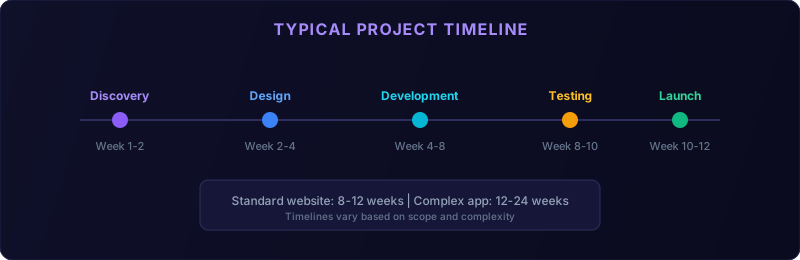
Here is a typical project timeline for different website types:
| Project Type | Discovery | Design | Development | Testing | Launch | Total |
|---|---|---|---|---|---|---|
| Brochure site (5-10 pages) | 1 week | 1-2 weeks | 2-3 weeks | 1 week | 1 week | 6-8 weeks |
| Business site (10-20 pages) | 1-2 weeks | 2-3 weeks | 3-4 weeks | 1-2 weeks | 1 week | 8-12 weeks |
| E-commerce (under 100 products) | 1-2 weeks | 2-3 weeks | 4-6 weeks | 2 weeks | 1 week | 10-14 weeks |
| Custom web application | 2-3 weeks | 3-4 weeks | 6-12 weeks | 2-3 weeks | 1-2 weeks | 14-24 weeks |
Here is what a professional web development engagement should look like:
Phase 1: Discovery (Week 1-2)
- Stakeholder interviews to understand your business, audience, and goals
- Competitive analysis of 3-5 competitors' websites
- Sitemap and information architecture planning
- Technical requirements gathering
Phase 2: Design (Week 2-4)
- Wireframes showing layout and user flow
- Visual mockups with your branding, colors, and typography
- Responsive designs for mobile, tablet, and desktop
- Design review and revision rounds (typically 2-3)
Phase 3: Development (Week 4-8)
- Frontend coding (HTML, CSS, JavaScript, React, Next.js, etc.)
- Backend development (databases, APIs, integrations)
- CMS setup so you can edit content yourself
- Form handling, email integration, analytics setup
- SEO implementation (page structure, meta tags, schema markup)
Phase 4: Testing (Week 8-9)
- Cross-browser testing (Chrome, Safari, Firefox, Edge)
- Mobile device testing
- Performance optimization (page speed, image compression)
- Accessibility testing
- Form and functionality testing
Phase 5: Launch (Week 9-10)
- DNS and hosting configuration
- SSL certificate setup
- 301 redirects from old URLs (if redesign)
- Search Console submission
- Post-launch monitoring
Phase 6: Post-Launch (Ongoing)
- Bug fixes (typically covered for 30 days)
- Performance monitoring
- Content updates
- Ongoing optimization based on analytics data
Custom Website vs Template: Making the Right Choice
One of the biggest decisions is whether to use a template (WordPress theme, Squarespace, Wix) or build custom.
Templates work when:
- Your needs are standard (brochure site, basic blog, simple portfolio)
- Budget is under $5,000
- You need the site live quickly (2-4 weeks)
- You plan to manage content yourself
- You need specific functionality (booking systems, calculators, portals)
- Your brand needs a unique visual identity (not template-y)
- Performance and SEO are competitive advantages
- You are building a web application, not just a website
How to Choose a Web Development Partner
What to look for:
- A portfolio that matches your needs - Do they build sites for businesses like yours?
- A clear process - Can they explain how they work, step by step?
- Technical breadth - Can they handle design, development, SEO, and maintenance?
- Communication - Do they respond promptly? Do they explain things in plain English?
- Post-launch support - What happens after the site goes live?
Questions to ask:
- "Who will be working on my project?" (You want named people, not a faceless team)
- "What is included in the price, and what costs extra?"
- "Can I see examples of sites you have built for similar businesses?"
- "How do you handle revisions and feedback?"
- "What happens if the project takes longer than estimated?"
- "Will I own the code and design files?"
Pricing models:
| Model | How It Works | Best For |
|---|---|---|
| Fixed price | Agreed scope for agreed price | Well-defined projects |
| Hourly | Pay for time spent | Ongoing work, unclear scope |
| Retainer | Monthly fee for allocated hours | Maintenance and continuous improvement |
| Value-based | Price based on business impact | Revenue-generating applications |
For specific pricing at every level, our website cost breakdown has honest numbers by business type. And if you are weighing options, the custom vs template comparison shows the real 3-year cost of each approach.
The Technical Stuff You Should Understand
You do not need to be a developer, but understanding these concepts helps you make better decisions:
Responsive Design
Your site must work perfectly on every screen size - phone, tablet, laptop, desktop. This is not optional in 2026; Google uses mobile-first indexing. Our article on responsive and mobile-first design explains why this matters.Page Speed
Slow websites lose visitors and rank lower in search. Your site should load in under 3 seconds. Key factors: image optimization, clean code, good hosting, and minimal third-party scripts.Accessibility
Your website should be usable by everyone, including people with disabilities. This is both the right thing to do and increasingly a legal requirement. Read more about why web accessibility matters.SEO-Friendly Architecture
A beautiful website that cannot be found on Google is a billboard in the desert. Your development team should build with SEO in mind from day one - clean URLs, proper heading hierarchy, fast loading, structured data, and a crawlable sitemap.For the SEO fundamentals that should be part of every web development project, see our SEO strategy guide.
Security
SSL certificates, regular updates, secure forms, and proper data handling are baseline requirements. Do not skip security to save a few hundred dollars.The Website as a Lead Generation Machine
A website is not just an online brochure - it should actively generate leads. Key elements that turn visitors into customers:
- Clear value proposition above the fold (visitors should know what you do in 5 seconds)
- Strong calls to action on every page (not just the contact page)
- Social proof - testimonials, case studies, client logos, review scores
- Lead magnets - free resources, audits, or consultations in exchange for email addresses
- Live chat or chatbot for immediate engagement
Red Flags When Hiring a Web Developer
Use this checklist when evaluating web development proposals:
Must-Have Items in Any Proposal:
- [ ] Detailed scope of work with page-by-page breakdown
- [ ] Timeline with milestones and deliverable dates
- [ ] Number of design revision rounds included
- [ ] Responsive design for mobile, tablet, and desktop
- [ ] Basic SEO setup (meta tags, sitemap, page speed)
- [ ] Content management system for easy updates
- [ ] Post-launch support period (minimum 30 days)
- [ ] Ownership of all code and design files
- [ ] Hosting and domain management plan
- [ ] Accessibility compliance (WCAG 2.1 AA minimum)
- [ ] Analytics and conversion tracking setup
- [ ] Email integration (newsletter signup, form notifications)
- [ ] Security hardening and SSL certificate
- [ ] Performance optimization (Core Web Vitals passing)
- [ ] Training session for content editing
🚩 No portfolio or examples - If they cannot show past work, they are either brand new or hiding something.
🚩 Unrealistically low pricing - A quality business website for $500 does not exist. You get what you pay for.
🚩 Proprietary platforms that lock you in - Some agencies build on their own platform so you cannot leave. Always ask: "Do I own the code?"
🚩 No post-launch plan - A website needs ongoing maintenance. If they launch and disappear, you are on your own.
🚩 Design-only focus - A pretty website that is slow, inaccessible, and invisible to Google is a failure. Demand performance and SEO alongside aesthetics.
Your Next Step
Whether you need a new website, a redesign, or a custom web application, the key is finding a partner who balances design, performance, SEO, and your business goals.
Start by defining what your website needs to do (not just look like), then find a team that can deliver that outcome.
Ready to explore what a professional website looks like for your business? Check out our web development services or get in touch for a free project consultation.
Frequently Asked Questions
How long does it take to build a website? A professional business website takes 4-12 weeks depending on complexity and content readiness.
What should web development services include? Strategy, design, development, content setup, SEO, testing, launch, and post-launch support.
Do I need a custom website or a template? Templates work for simple sites under $5,000. Custom builds suit businesses needing performance and unique features.
How do I choose a web development agency? Review their portfolio, ask about their process, check references, and ensure post-launch support is included.
What does website maintenance cost? Budget $200-$2,000/month for hosting, security, updates, and ongoing optimization depending on complexity.