The Most Common Website Question We Get
"Should I use a template or build something custom?"
We hear this from nearly every prospective client. And the honest answer is: it depends. A template can be the perfect choice - or a costly mistake. Same goes for custom. The right answer depends on your goals, budget, timeline, and what you are trying to accomplish online.
Let us break it down.
Template Websites: What You Are Actually Getting
When people say "template," they usually mean one of these:
Website Builders (Squarespace, Wix, Webflow)
- Drag-and-drop editors with pre-designed layouts
- Hosting and maintenance included
- Limited customization beyond what the builder allows
- Cost: $15-50/month + your time (or $1,000-5,000 for a designer to set it up)
WordPress with a Theme
- A pre-designed theme installed on WordPress
- Much more customizable than website builders
- Requires hosting, updates, and security management
- Cost: $100-500 for a premium theme + $2,000-8,000 for professional setup
Template Pros
✅ Fast to launch - A basic site can be live in days, not weeks
✅ Lower upfront cost - $1,000-5,000 vs $10,000+ for custom
✅ Proven designs - Popular templates have been tested by thousands of sites
✅ Easy content editing - Most templates have simple drag-and-drop editors
✅ Good enough for many businesses - If you need a brochure site with 5-10 pages, a template works fine
Template Cons
❌ You look like everyone else - Popular templates are used by thousands of sites. Your competitors might have the same layout.
❌ Performance ceiling - Templates include features you do not use, slowing your site down. Page builders like Elementor are notorious for bloated code.
❌ Limited functionality - Need a custom calculator, portal, or booking flow? You will hit the template's limits fast.
❌ Plugin dependency - WordPress sites often rely on 15-30 plugins, each a potential security vulnerability and performance drag.
❌ SEO limitations - Templates often generate messy HTML, slow load times, and poor Core Web Vitals scores.
❌ You do not own the platform - If Squarespace or Wix changes their pricing, limits features, or shuts down, your site goes with them.
Custom Websites: What You Are Actually Getting
A custom website is built specifically for your business - from the ground up or using modern frameworks (React, Next.js, Vue) with custom design and functionality.
Custom Pros
✅ Unique design - Your site looks like your brand, not a template with your logo
✅ Performance optimized - Every line of code serves a purpose. No bloat, no unnecessary features.
✅ SEO advantage - Clean HTML, fast load times, proper heading structure, and schema markup. This directly impacts your rankings.
✅ Unlimited functionality - Anything you can imagine, you can build. Custom forms, integrations, dashboards, automation.
✅ Scalability - As your business grows, your site grows with it. No rebuilding when you outgrow a template.
✅ You own everything - Code, design, data. No platform lock-in.
Custom Cons
❌ Higher upfront cost - $5,000-50,000+ depending on complexity
❌ Longer timeline - 6-16 weeks vs 1-4 weeks for a template
❌ Requires a developer for changes - Unless a CMS is built in (it should be)
❌ Maintenance responsibility - You need a plan for updates, security, and hosting
The Real Comparison: Side by Side
| Factor | Template | Custom |
|---|---|---|
| Upfront cost | $1,000-5,000 | $5,000-50,000+ |
| Monthly cost | $15-50 (builder) or $30-100 (hosting) | $20-200 (hosting) |
| Launch timeline | 1-4 weeks | 6-16 weeks |
| Design uniqueness | Low-medium | High |
| Page speed | Often slow (bloated code) | Fast (optimized) |
| SEO performance | Decent if configured well | Excellent by default |
| Functionality | Limited to template/plugins | Unlimited |
| Content editing | Easy (drag-and-drop) | Easy (with CMS built in) |
| Scalability | Limited | Unlimited |
| Ownership | Platform-dependent | Full ownership |
A website is only as good as its ability to generate business. Whichever route you choose, make sure it is built to convert with our guide on turning your website into a lead generation machine. And if your current site is underperforming, 10 signs your website needs a redesign will help you decide.
When Templates Are the Right Choice
- Your budget is under $5,000 and you need a site now, not in three months.
- You need a simple brochure site - 5-10 pages, no complex functionality.
- You are testing a business idea and need an MVP to validate before investing.
- Your competitive advantage is not your website - your product or service sells itself, and the website is just a confirmation.
- You plan to upgrade later - a template now and a custom site in 12-18 months is a perfectly valid strategy.
Best template options by use case:
- Simplest setup: Squarespace (great for designers, restaurants, portfolios)
- Most flexibility: WordPress + premium theme (good for blogs, content-heavy sites)
- Best design control: Webflow (bridges the gap between template and custom)
- E-commerce: Shopify (purpose-built for selling products)
When Custom Is the Right Choice
- Your website IS your product - SaaS, web apps, marketplaces, portals.
- You need serious performance - Especially important for SEO in competitive markets. A 0.5-second load time advantage can mean higher rankings and more conversions.
- Your business has complex needs - Custom pricing calculators, booking systems, client dashboards, API integrations.
- Your brand demands uniqueness - You are in a competitive market where looking generic undermines trust.
- You are investing in long-term SEO - Custom sites built with frameworks like Next.js give you full control over technical SEO, structured data, and performance - advantages templates cannot match.
The Hidden Costs Nobody Talks About
Here is the true 3-year total cost comparison:
| Cost Factor | Template (WordPress) | Template (Squarespace) | Custom (Next.js/React) |
|---|---|---|---|
| Initial build | $2,000-5,000 | $1,000-3,000 | $8,000-25,000 |
| Hosting (3 years) | $1,080-3,600 | $540-1,440 | $720-2,160 |
| Plugin licenses (3 years) | $1,800-5,400 | $0 | $0 |
| Security fixes (3 years) | $1,500-5,000 | $0 | $500-1,500 |
| Maintenance (3 years) | $3,600-7,200 | $0-1,800 | $2,400-6,000 |
| Redesign (year 2-3) | $3,000-8,000 | $2,000-5,000 | $0 (not needed) |
| 3-Year Total | $13,000-34,200 | $3,500-11,240 | $11,600-34,660 |
Template Hidden Costs
- Plugin subscriptions - WordPress sites often accumulate $100-300/month in premium plugins
- Performance fixes - Hiring a developer to speed up a bloated template site
- Redesign in 2 years - When you outgrow the template, you start over
- Security breaches - WordPress plugins are the #1 attack vector. A hack can cost $5,000-20,000+ to remediate
- Agency rebuild - Many businesses spend $3,000 on a template, then $15,000 on a custom rebuild a year later. That is $18,000 total - more than building custom from the start.
Custom Hidden Costs
- Ongoing maintenance - Budget $200-500/month for hosting, updates, and small changes
- Feature creep - Custom projects can expand in scope if requirements are not locked down
- Developer dependency - If your developer disappears, finding someone to work with custom code can be challenging (mitigated by using popular frameworks and clean documentation)
Still not sure which route is right? Get a free consultation and we will recommend the best approach based on your goals, budget, and timeline.
The Hybrid Approach
Some businesses get the best of both worlds:
- Headless CMS + Custom Frontend - Use a CMS like Sanity, Strapi, or Contentful for easy content editing, paired with a custom-coded frontend for performance and design. This is what most modern agencies (including us) recommend.
- Webflow for design, custom code for functionality - Start with Webflow for the marketing pages, add custom-built features as needed.
- WordPress backend + custom theme - WordPress for content management, but a completely custom-designed theme (no off-the-shelf template).
Making Your Decision
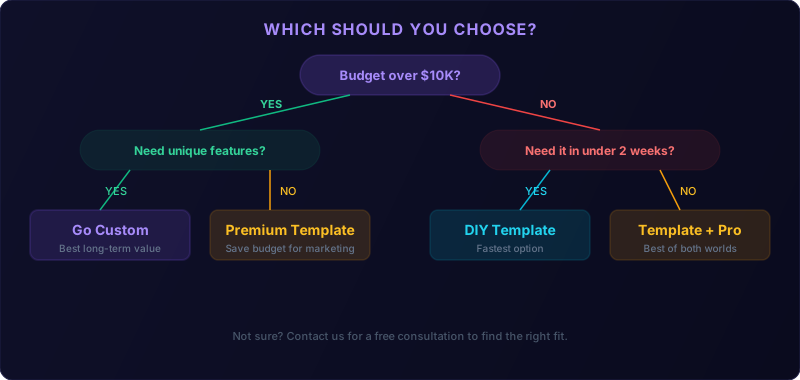
Ask yourself:
- What is my website's primary job? If it is generating leads in a competitive market, custom gives you an edge. If it is a confirmation for referrals, a template is fine.
- What is my realistic budget? Be honest. A $3,000 budget means a template. A $15,000 budget opens the door to custom.
- How important is speed-to-launch? Need it next week? Template. Can wait 2-3 months? Custom is an option.
- Where do I want to be in 2 years? If you are planning significant growth, building custom now often costs less than rebuilding later.
- How competitive is my market online? In competitive niches, the performance and SEO advantages of custom development can be the difference between page one and page three.
The Bottom Line
Templates are not bad. Custom is not always better. The right choice is the one aligned with your business goals, budget, and growth trajectory.
If you are unsure, reach out for a free consultation. We will give you an honest recommendation based on your specific situation - even if the right answer is a $30/month Squarespace site.
Frequently Asked Questions
Are website templates bad for SEO? Not inherently, but templates often produce bloated code and slower load times that hurt rankings.
Can I switch from a template to custom later? Yes, but it is essentially starting over. Plan for this if choosing a template as a short-term solution.
Is WordPress a template or custom? Both. WordPress with a theme is template-based. WordPress with a custom theme is custom development.
What is the cheapest way to get a professional website? Squarespace or WordPress with a premium theme, professionally configured, starting around $1,500-$3,000.
How long does a custom website last before needing a redesign? A well-built custom site lasts 4-7 years. Templates typically need replacing every 2-3 years.