Your website looks wrong. Maybe there is content you did not write, or visitors are getting redirected to a spam site. Maybe Google flagged your site with a "This site may be hacked" warning. Your stomach drops. What do you do first?
Short answer: Take the site offline immediately, change every password, scan for malware, restore from a clean backup, then harden your security. Speed matters. Every hour a hacked site stays live, you are at risk of data exfiltration, customer trust damage, and SEO penalties from Google flagging the domain as compromised.
Step 1: Detect and Confirm the Hack
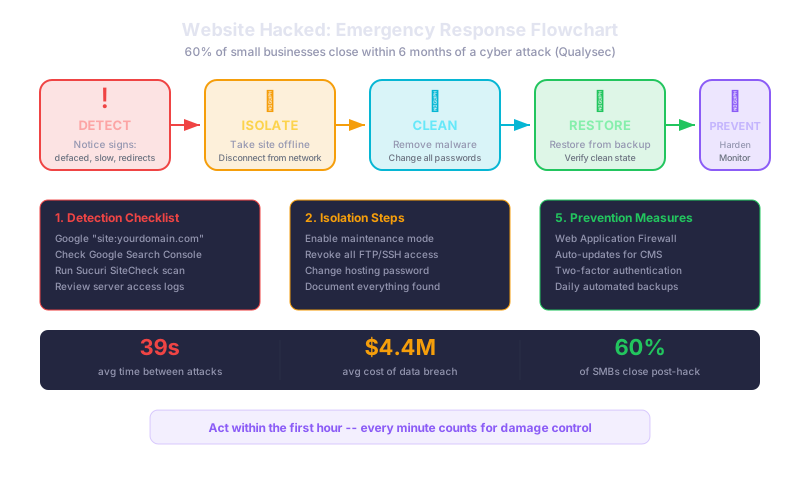
Before panicking, confirm what happened. Common signs include: your site redirects to another domain, there is unfamiliar content or pages, Google Search Console shows security warnings, your hosting provider sent a malware notification, or your site is suddenly very slow.
Run a quick scan using a free tool like Sucuri SiteCheck. Search Google for "site:yourdomain.com" and look for pages you did not create, especially pages with pharmaceutical or gambling terms. Check your Google Search Console for security issues or unexpected spikes in indexed pages.
Step 2: Isolate the Site
Take your website offline immediately. Enable maintenance mode or ask your hosting provider to suspend the site temporarily. This stops the damage from spreading to visitors and prevents further data loss.
Revoke all FTP and SSH access. Change your hosting control panel password. If you use WordPress, change the admin password and secret keys in wp-config.php. Document everything you find; you may need this information later for reporting or insurance purposes.
Step 3: Clean the Infection
If you have a clean backup from before the hack, restoring it is often the fastest path to recovery. Make sure the backup predates any suspicious activity. If you do not have a recent clean backup, you will need to manually remove the malware.
Change every password: hosting, CMS admin, database, FTP, email, and any connected third-party services. Do not reuse any of the old passwords. Enable two-factor authentication on every account that supports it.
For WordPress sites, reinstall core files, delete and reinstall all plugins and themes from fresh copies, and check your database for injected code. For custom sites, compare your files against a known clean version and look for recently modified files.
Step 4: Restore and Verify
Once cleaned, bring the site back online and test thoroughly. Resubmit your site to Google Search Console for review if you received a security warning. Run another malware scan to confirm the site is clean.
Ransomware attacks increased 32% globally in 2025, with Ransomware-as-a-Service growing 60%, making it easier for amateur hackers to launch attacks. The global average cost of a data breach is $4.4 million. Even for small businesses, recovery costs can be devastating, with 70% of small businesses saying recovering from a cyber attack is harder than dealing with a natural disaster.
Step 5: Prevent It From Happening Again
Install a Web Application Firewall (WAF) like Cloudflare or Sucuri. Set up daily automated backups stored off-site. Keep your CMS, plugins, and themes updated automatically. Use strong, unique passwords with a password manager. Implement two-factor authentication for all admin access. Set up uptime monitoring that alerts you to unexpected changes.
What This Means for Your Business
A hacked website is not just a technical problem. It damages customer trust, hurts your search rankings, and can result in legal liability if customer data is exposed. The businesses that survive hacks are the ones that respond quickly, have backups in place, and invest in prevention before it happens.
Act within the first hour. Every minute counts for damage control.
Related reads:
Need help recovering from a hack or hardening your website security? We provide emergency response and ongoing security monitoring for small business websites. Contact us now.