You have outgrown your website. It looks dated, loads slowly, and does not reflect your business anymore. A redesign is overdue. But here is the risk nobody warns you about: many small businesses lose 30-60% of their organic traffic after a redesign because they focus on design and ignore search performance.
Short answer: A website redesign does not have to kill your rankings. Follow a three-phase approach: pre-launch (document everything), during launch (implement 301 redirects and verify technical SEO), and post-launch (monitor and fix issues fast). A minor re-indexing dip of 5-10% for two weeks is normal. A 50%+ drop means something went wrong.
Phase 1: Pre-Launch (This Is Where It Matters Most)
Eighty percent of SEO damage from a redesign happens because of what was not done before launch. This phase is about documenting what you have so nothing valuable gets lost.
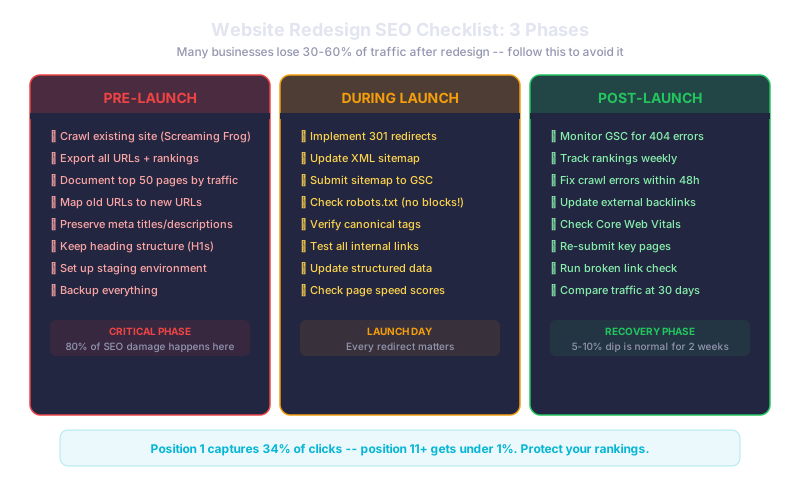
Crawl your existing site with a tool like Screaming Frog or Sitebulb. Export every URL, its status code, page title, meta description, and heading structure. Identify your top 50 pages by organic traffic using Google Analytics or Search Console. These are the pages you absolutely cannot afford to break.
Create a URL mapping document: old URL on the left, new URL on the right. Every page that changes its URL needs a 301 redirect. Every page you plan to remove needs a redirect to the most relevant replacement.
Preserve your meta titles and descriptions for high-performing pages. Keep your H1 heading structure intact. Back up everything, including your database and all site files.
Phase 2: During Launch
This is execution day. Your 301 redirects need to be in place before the new site goes live. Every old URL should resolve to its corresponding new URL with a permanent redirect. Broken redirects are the number one cause of post-redesign traffic loss.
Update your XML sitemap with all new URLs and submit it to Google Search Console immediately. Check your robots.txt file to make sure you have not accidentally blocked search engines from crawling the new site (this happens more often than you would think).
Verify canonical tags point to the correct URLs. Test every internal link on the new site. Update all structured data and schema markup to reflect any changes. Run Google PageSpeed Insights on key pages to confirm load times are acceptable.
Phase 3: Post-Launch
Monitor Google Search Console daily for the first two weeks. Look for spikes in 404 errors, crawl issues, or indexing problems. Fix crawl errors within 48 hours; do not let them linger.
Track your keyword rankings weekly. A small dip of 5-10% for two weeks is normal as Google re-indexes your site. If rankings drop more than that or do not recover within a month, investigate specific pages.
Position one in Google captures up to 34% of desktop clicks, while page two results get under 1%. Losing just a few ranking positions can halve your organic traffic. Reach out to sites linking to your old URLs and ask them to update their links. Run a broken link check at 7, 14, and 30 days post-launch. Compare your traffic and conversion metrics at 30 days against the pre-redesign baseline.
What This Means for Your Business
A redesign should improve your website, not destroy your search presence. The businesses that lose traffic are the ones that skip the pre-launch documentation and redirect planning. The ones that gain traffic treat the redesign as both a design project and an SEO migration project.
Print this checklist. Assign each item to a person on your team. Do not launch until every pre-launch item is checked off.
Related reads:
Planning a website redesign? We handle the SEO migration alongside the design work so you do not lose the traffic you have built. Let us plan it together.