
You run a business from home or travel to customers. You do not have a storefront, so setting up Google Business Profile feels like a maze of rules you might accidentally break. You are not alone. Service-area businesses (SABs) make up a huge share of local businesses, and Google has specific rules for each type.
Short answer: You can absolutely have a Google Business Profile as a home-based or service-area business. You must hide your physical address, set up to 20 service areas, and avoid using PO Boxes or virtual offices. But know this: Google ranks SABs primarily based on the hidden physical address, not the listed service areas.
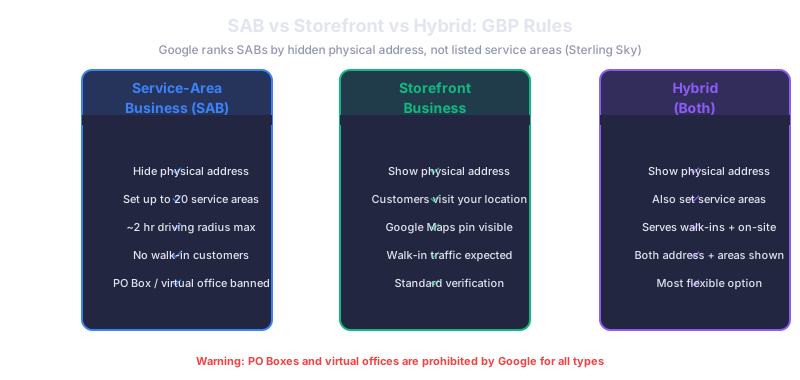
SAB vs Storefront vs Hybrid: Know Your Type
Google treats three types of businesses differently on its platform.
A Service-Area Business (SAB) goes to the customer. Plumbers, electricians, mobile dog groomers, and house cleaners are common examples. You must hide your address. Customers cannot visit your location. You define areas you serve, not where you are.
A Storefront Business has a physical location customers visit. Restaurants, retail shops, dental offices. Your address is public and visible on the map with a pin.
A Hybrid Business does both. A bakery that also delivers. A plumber with a showroom. You show your address and set service areas.
Setting Up Your SAB Profile Correctly
Start by creating your profile at business.google.com. When it asks if customers visit your location, select "No" for pure SABs. This triggers the service-area setup and automatically hides your address.
Google limits you to a maximum of 20 service areas (Google Support documentation). These can be cities, counties, ZIP codes, or states. Choose areas where you actually provide service. Do not blanket an entire state if you only serve three cities. Google recommends that service area boundaries should not exceed approximately two hours of driving time from your location.
Your physical address must be a real place where you receive mail. PO Boxes and virtual offices are prohibited (BirdEye). Google will suspend profiles using these. If you work from home, your home address is fine. It just will not be visible to customers.
The Ranking Factor Most SABs Do Not Know
Here is the critical insight: Sterling Sky research shows that Google ranks service-area businesses based on the hidden physical address, not the listed service areas. If your home is in the suburbs and you list downtown as a service area, you will rank weaker for downtown searches than a competitor whose hidden address is actually downtown.
This means your physical location matters enormously even though customers never see it. If you are serious about ranking in a specific area, consider whether your home address gives you a geographic advantage or disadvantage.
Optimization Tips for SABs
Complete every section of your profile. Businesses with complete profiles get seven times more clicks (Google). Add at least 25 photos of your work, your team, and your branded vehicle or equipment.
Build reviews aggressively. Since you do not have a visible storefront, reviews are the primary trust signal for customers finding you online. Aim for at least 50 reviews in your first year.
Post weekly on your profile. As we cover in our GBP posting guide, businesses posting weekly see 26 percent more impressions. For SABs competing without a visible location, this is even more important.
Choose your primary category carefully. For plumbing businesses, the primary category should be "Plumber" rather than "Plumbing service." Google weighs the primary category heavily for ranking.
Common SAB Mistakes That Trigger Suspension
Using a PO Box, UPS Store, or virtual office address. Showing your home address when you should be hiding it (pure SABs must hide). Listing service areas far outside your realistic service radius. Creating multiple profiles for the same business at different addresses. Any of these can trigger a suspension that takes weeks to resolve.
What This Means for Your Business
As a home-based or service-area business, your Google Business Profile is your most important digital asset for local visibility. Set it up correctly from the start: hide your address, choose realistic service areas, and understand that your hidden location still drives your ranking. Invest in reviews, photos, and weekly posts to compete effectively against storefronts.
Related reads:
- Google Business Profile Suspended? How to Fix It
- What to Post on Google Business Profile (Weekly Ideas)
Need help setting up or optimizing your service-area business profile? Our local SEO team specializes in GBP setup and optimization for SABs. Get started