
Your Google Business Profile Is Your Most Visible Online Asset
When someone searches for a service in your area, your Google Business Profile (GBP) listing is often the first thing they see - before your website, before your social media, before anything else.
The Map Pack (those 3 business listings with the map at the top of Google) gets 42% of all clicks for local searches. If you are not in it, you are losing nearly half your potential customers to competitors who are.
This guide walks you through every optimization, from the basics to advanced tactics that most businesses miss.
Getting Started: Claim and Verify
If You Do Not Have a GBP Yet
- Go to business.google.com
- Search for your business. If it already exists (Google sometimes creates listings automatically), claim it. If not, create a new listing.
- Choose your business type:
Verification Methods
Google needs to verify you are a real business. Options include:- Postcard - Google mails a code to your address (5-14 days)
- Phone - Automated call with a verification code
- Email - Code sent to your business email
- Video - Record a video of your location and signage
- Live video call - A Google rep verifies via video chat
Essential Optimizations
Business Name
Use your real, registered business name. Nothing more, nothing less.Right: "Semark LLC" Wrong: "Semark LLC | Best Digital Marketing Agency Dallas TX"
Keyword stuffing your business name violates Google's guidelines and can result in listing suspension. Google is aggressive about enforcing this - do not risk it.
Primary Category
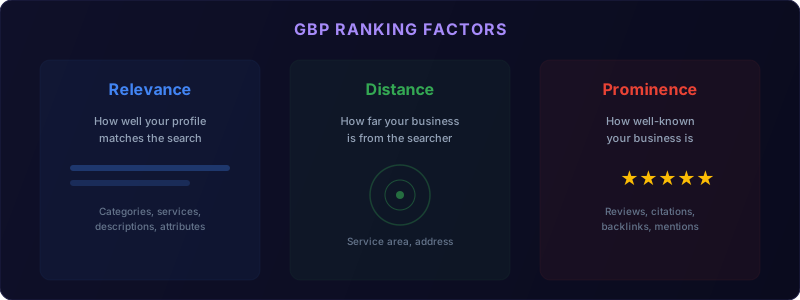
Your primary category is the single most important ranking factor for the Map Pack. Choose the category that most precisely describes your main business.Examples:
- "Web designer" (not "Internet marketing service" if web design is your main service)
- "Digital marketing agency" (not "Marketing consultant" if you are an agency)
Secondary Categories
Add up to 9 secondary categories for additional services:- Web designer + Software company + Internet marketing service + SEO company
Business Description
You get 750 characters. Use them wisely:- Lead with what you do and who you serve
- Include primary keywords naturally
- Mention your service area
- End with a call to action
Services
Add every service you offer. For each service:- Service name
- Description (300 characters max)
- Price or price range (optional but recommended)
Attributes
Google offers various attributes depending on your business type:- Women-owned, veteran-owned, LGBTQ-friendly
- Online appointments available
- Free Wi-Fi, wheelchair accessible
- And many more
Photos and Visual Content
This is where most businesses drastically underperform. BrightLocal's analysis of 45,000 Google Business Profile listings found that profiles with a rich, frequently updated photo library consistently generate more calls, direction requests, and website clicks than sparse ones. A complete photo library is one of the highest-leverage optimizations you can make.
Photo Strategy
Upload immediately:
- Professional exterior photo (helps people find you)
- Interior photos if you have a physical office
- Team photos (people trust businesses with faces)
- Logo (appears in search results)
- Cover photo (the first image people see)
- Work samples and portfolio pieces
- Behind-the-scenes team moments
- Client results (with permission)
- Event photos
- Office life
Photo Best Practices
- Minimum 720x720 pixels (Google recommends)
- Well-lit, professional quality
- No stock photos (Google can detect these)
- Geotagged with your business location
- Named descriptively (dallas-web-design-team.jpg, not IMG_4872.jpg)
Video
Upload short (30-60 second) videos:- Office tour
- Team introductions
- Service explanations
- Client testimonials
Reviews: The Make-or-Break Factor
Here is how review metrics impact your Map Pack ranking:
| Review Metric | Ranking Impact | Benchmark (Good) | Benchmark (Great) |
|---|---|---|---|
| Total review count | High | 50+ | 150+ |
| Average star rating | High | 4.5+ | 4.8+ |
| Review recency | Medium-High | 1-2 per month | 4+ per month |
| Review response rate | Medium | 80%+ | 100% |
| Review response time | Medium | Within 48 hours | Within 24 hours |
| Reviews mentioning services | Medium | 20%+ | 40%+ |
| Reviews with photos | Low-Medium | 10%+ | 25%+ |
Why Reviews Matter
- Ranking factor - More quality reviews = higher Map Pack position
- Trust signal - 97% of consumers read reviews before choosing a local business (BrightLocal Local Consumer Review Survey 2026)
- Click-through rate - Listings with 4.5+ stars get significantly more clicks
- Conversion factor - Every additional star can increase revenue by 5-9%
Getting More Reviews
Ask systematically:
- Identify your happiest clients (just completed a project, just saw great results)
- Send a direct link to your Google review page
- Make it personal - a quick email or text, not an automated blast
- Time it right - ask within 48 hours of a positive experience
Follow-up template: "Hi [Name], it was great working with you on [project]. If you have 2 minutes, we would really appreciate a Google review - it helps other businesses find us. Here is the direct link: [your review link]. Thank you!"
Responding to Reviews
Positive reviews: Thank them by name, mention the specific service, and keep it genuine. Responses show future customers you care.
Negative reviews: Respond professionally within 24 hours. Acknowledge the issue, apologize, offer to resolve it offline. Never argue publicly. A thoughtful response to a negative review can actually build trust.
Review response tips:
- Respond to 100% of reviews (Google tracks this)
- Include keywords naturally in your responses
- Keep responses authentic - not template-y
- Use the owner's name, not "The Team" - personal responses feel more genuine
Google Business Profile Posts
GBP posts are free micro-content that appears on your listing. They keep your profile fresh and give Google more content to understand your business.
Post Types
| Type | Best For | Duration |
|---|---|---|
| Update | News, tips, announcements | 6 months |
| Offer | Promotions, discounts | Custom dates |
| Event | Webinars, workshops, sales | Custom dates |
Posting Strategy
- Post at least once per week
- Include a photo or graphic with every post
- Add a CTA button (Learn more, Call now, Book online)
- Include relevant keywords naturally
- Link to relevant pages on your website
Content Ideas for Weekly Posts
- Monday: Share a blog post or tip
- Wednesday: Highlight a service
- Friday: Share a client win or behind-the-scenes moment
Advanced Optimizations
Weekly GBP management checklist:
- [ ] Post one update with photo and CTA
- [ ] Respond to all new reviews
- [ ] Check and answer any new Q&A questions
- [ ] Upload 2-3 new photos
- [ ] Review insights for trending search queries
- [ ] Verify business hours are accurate
- [ ] Check for and report fake competitor reviews
- [ ] Update any seasonal services or offers
Q&A Section
Google's Q&A feature lets anyone ask questions about your business. The problem: if you do not manage it, random people answer.Strategy:
- Ask and answer your own FAQs (this is encouraged by Google)
- Cover your top 10 customer questions
- Monitor for new questions and answer promptly
- Include keywords naturally in your answers
Products/Services Catalog
If applicable, add products with:- Photos
- Descriptions
- Prices
- Links to your website
Booking Integration
If you offer consultations or appointments, integrate a booking tool:- Google's native booking
- Calendly
- HubSpot Meetings
- Book directly through your website
Measuring GBP Performance
Key Metrics to Track
Discovery:
- How many people found your listing
- Which search queries triggered your listing
- Search vs Maps views
- Website clicks
- Direction requests
- Phone calls
- Message conversations
Monthly Review
Each month, check:- Which search queries are driving views? (Optimize for growing queries)
- Which actions are customers taking? (If calls are low, check your phone number and hours)
- How do your photos compare to competitors? (Google shows a comparison)
- Are reviews trending up or down?
GBP and Your Broader SEO Strategy
Your Google Business Profile does not exist in a vacuum. It works best when integrated with your overall SEO and marketing strategy:
- Your website supports your GBP with local content, schema markup, and NAP consistency
- Citations reinforce your business information across the web
- Content marketing drives traffic and builds the authority that GBP leverages
- Social media generates reviews, engagement, and brand visibility
Your GBP works best when your website backs it up. Make sure your site is fast, mobile-friendly, and converting visitors with our web development services guide. And for the full picture of local marketing, our digital marketing budget guide helps you allocate spending across GBP, SEO, and ads.
Common GBP Mistakes
- Keyword-stuffed business name - Will get you suspended
- Inconsistent NAP - Different address format on GBP vs your website vs Yelp
- No photos - You are invisible compared to competitors with 100+ photos
- Ignoring reviews - Not asking for them, not responding to them
- Never posting - A stale profile signals an inactive business
- Wrong categories - Showing up for irrelevant searches wastes impressions
- Missing services - Google cannot match you with searches if it does not know what you offer
Want us to optimize your Google Business Profile for you? Book a free local SEO consultation and we will audit your listing and create an optimization plan.
Your GBP Action Plan
Today: Claim and verify your listing (if not already done)
This week: Complete every field - name, categories, description, services, attributes, hours
This month: Upload 30+ photos, start asking for reviews, begin posting weekly
Ongoing: Post weekly, respond to all reviews within 24 hours, add new photos regularly, monitor performance monthly
Your Google Business Profile is free, powerful, and criminally underutilized by most small businesses. A fully optimized profile can be the difference between getting found and getting skipped.
Need help optimizing your local search presence? Explore our SEO services or contact us for a free audit.
Frequently Asked Questions
Is Google Business Profile free? Yes. Creating, verifying, and optimizing your Google Business Profile costs nothing.
How long does GBP verification take? Phone and email verification is instant. Postcard verification takes 5-14 days to arrive.
Can I have multiple Google Business Profile listings? Only if you have multiple physical locations. One listing per address is the rule.
How often should I post on Google Business Profile? At least once per week. Regular posting signals an active business and improves local visibility.
Do Google reviews affect my search ranking? Yes. Review quantity, quality, recency, and your response rate all influence map pack rankings.