
You upload a PDF of your menu to your website because it is easy and matches the printed version. But that PDF is hurting you in three ways you probably do not know about: search engines deprioritize it, it creates a legal liability, and it drives away mobile visitors.
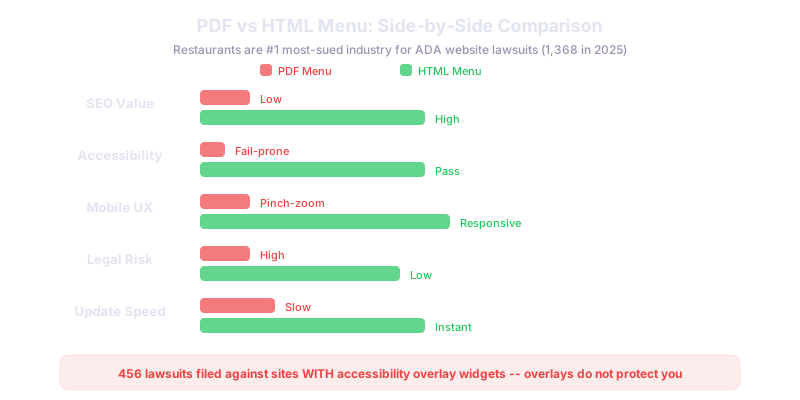
Short answer: HTML, every time. Google deprioritizes PDF content compared to HTML (SiteSeeingMedia). Over 60 percent of restaurant visits come from mobile searches per Nilead, and PDFs require pinch-zooming on phones. Worst of all, restaurants are the number one most-sued industry for ADA website lawsuits, with 1,368 cases in 2025 per EcomBack. Untagged PDF menus are the most common violation.
The SEO Case Against PDF Menus
Google can technically read text in PDFs, but it treats them differently from HTML pages. PDF content does not get indexed as quickly or as completely. It does not receive the same ranking weight as well-structured HTML. Links inside PDFs pass little to no authority. And PDFs do not appear in rich results like featured snippets.
When you put your menu in HTML, every menu item becomes indexable text. "House-smoked brisket tacos" can show up when someone searches "brisket tacos near me." With a PDF, that content is essentially invisible to most search queries.
The Accessibility and Legal Risk
This is the one that should get your attention. Restaurants are the most frequently sued industry for ADA website accessibility lawsuits (EcomBack). In 2025, 1,368 ADA lawsuits were filed against restaurant websites. The Bureau of Internet Accessibility (BOIA) identifies untagged PDF menus as the most common accessibility violation.
If your PDF menu does not have proper heading tags, alt text for images, reading order markup, and language tags, it fails accessibility standards. Screen readers cannot navigate it. Visually impaired customers cannot use it. And plaintiff attorneys know this.
Here is the important part: accessibility overlay widgets do not protect you either. EcomBack data shows 456 lawsuits were filed against websites that had accessibility overlay widgets installed. Overlays are not a legal shield.
The only reliable solution is an HTML menu that is built with semantic markup, proper heading structure, and alt text where images are used.
The Mobile Experience ProblemOver 60 percent of restaurant visits originate from mobile searches (Nilead). When those visitors tap "Menu" and get a PDF, they have to pinch, zoom, and scroll sideways to read it. Most give up and leave.
An HTML menu adapts to any screen size. Text is readable without zooming. Sections are expandable. Prices are clear. The experience matches what mobile users expect in 2026.
How to Build an HTML Menu
You do not need complex technology. A simple HTML page with clear headings for each section (Appetizers, Entrees, Desserts, Drinks) works perfectly. Use a clean layout with item name, description, and price. Add dietary icons (vegetarian, gluten-free, spicy) as accessible labels.
If you update your menu frequently, use a content management system that lets you edit items without touching code. Most modern restaurant websites built by agencies include a menu management feature.
For restaurants with large menus, use anchor links or tabs so customers can jump directly to the section they want. This improves both usability and time on page, which is a positive SEO signal.
What About Having Both?
You can offer a downloadable PDF alongside your HTML menu for customers who want to print it. But the HTML version must be the primary, indexed version. Make the HTML menu the default link in your navigation, and offer the PDF as a secondary option labeled "Download printable menu."
What This Means for Your Restaurant
Switch your menu from PDF to HTML this month. The SEO benefit compounds over time as your menu items start ranking for specific searches. The legal risk drops immediately. The mobile experience improves instantly. This is one of the highest-impact, lowest-effort changes a restaurant can make to its website.
Related reads:
- What Should a Plumber Website Look Like?
- Freelancer vs Agency for Your Website: Pros, Cons, and Real Costs
Need help building an accessible, SEO-friendly restaurant website? We build restaurant websites with HTML menus, mobile-first design, and ADA compliance built in. Talk to our team