
Your pricing page is the most visited page on your site that is not your homepage. It is where decision-makers go to figure out if your product fits their budget. And yet most SaaS companies treat it as a simple table of features and prices. That approach leaves significant revenue on the table.
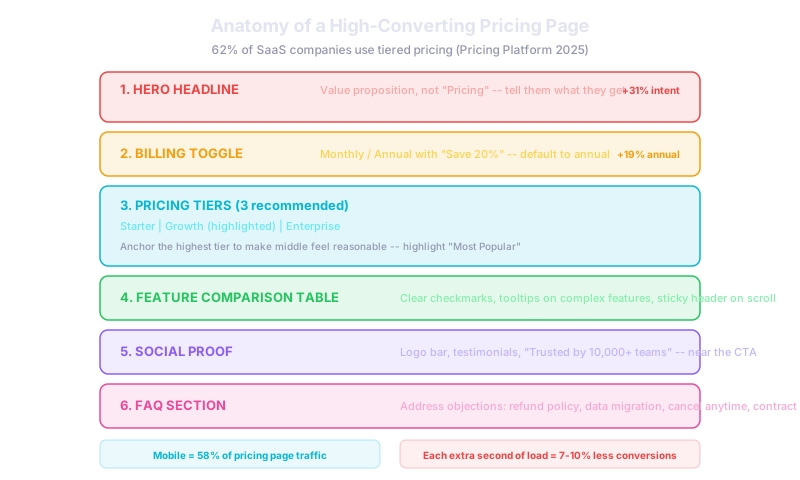
Short answer: 62% of SaaS companies use tiered pricing because it serves different customer segments and maximizes revenue (Pricing Platform's 2025 analysis). Mobile accounts for 58% of pricing page traffic, and mobile-optimized pricing pages convert 2.3 times better than desktop-only designs. Clear value communication increases purchase intent by 31%.
Three Tiers Is the Sweet Spot
Three pricing tiers is the standard for a reason. It allows you to use anchoring psychology where the highest tier makes the middle tier feel reasonable. It serves different customer segments: starter for individuals, growth for teams, and enterprise for large organizations. And it creates a clear upgrade path as customers scale.
Highlight your recommended plan. Label it "Most Popular" or "Best Value" and give it a visual distinction like a different border color or a "recommended" badge. This nudges undecided visitors toward the plan that works best for most users and typically delivers the highest revenue per customer.
Lead With Value, Not Price
A 2024 pricing psychology study found that clear value communication increases purchase intent by 31%. Your headline should not say "Pricing." It should communicate what the customer gets. "Everything you need to grow your business" or "Plans that scale with your team" frame the page around outcomes rather than cost.
Under each tier, lead with the key benefit rather than the price. "For growing teams that need collaboration" tells the visitor whether this plan is for them before they even look at the number.
Default to Annual BillingDefaulting to annual billing increases annual plan adoption by 19% (a 2024 pricing test). Show the monthly price crossed out next to the discounted annual price. "Save 20% with annual plans" is the standard messaging because it works.
Use a toggle that defaults to annual with monthly as the alternative. Most visitors will stick with the default, and annual billing improves your cash flow and reduces churn.
Optimize for Mobile
Mobile accounts for 58% of pricing page traffic in 2026. Stack tiers vertically on mobile rather than side by side. Keep feature comparison tables simple with toggle-to-expand sections. Ensure CTA buttons are thumb-friendly at a minimum of 44 by 44 pixels. A pricing page audit found that mobile-optimized pages convert 2.3 times better than desktop-only designs.
Add Social Proof Near the CTA
Place customer logos, testimonial quotes, or a "trusted by X teams" line near your call-to-action buttons. Social proof at the point of decision reduces hesitation. A logo bar from recognizable companies is especially effective for B2B SaaS.
FAQ Section Handles Objections
Every pricing page needs an FAQ section that addresses the most common objections: Can I cancel anytime? Is there a refund policy? How does data migration work? What happens if I outgrow my plan? These questions stop visitors from leaving your page to search for answers and never coming back.
Page Speed Matters
Your pricing page should load in under two seconds. Research shows that every additional second of load time reduces conversion by 7 to 10%. Compress images, minimize scripts, and test load times on mobile networks.
For SaaS companies building or redesigning their pricing page, combining these best practices with ongoing A/B testing ensures continuous improvement. If you are also building out a SaaS MVP, designing your pricing page early helps validate willingness to pay before you invest heavily in features.
What This Means for Your Business
Your pricing page is a conversion tool, not just an information page. Three clear tiers, annual billing as default, mobile optimization, social proof near CTAs, and a strong FAQ section are the foundation. Build it right, then test headlines, plan names, and CTA copy to find what resonates with your audience.
Related reads:
- Free Trial vs Freemium: Which Model Wins for SaaS?
- How to Get Your First 100 SaaS Customers
- Freelancer vs. Agency: Website Cost Comparison
Need a pricing page that converts? We design and build SaaS websites that turn visitors into paying customers. Talk to our team
