Why AI Automation Matters for Growing Businesses
If your team is spending hours on repetitive tasks - answering the same customer questions, manually entering data from invoices, or triaging support tickets - you are leaving money on the table. AI automation does not replace your team. It removes the grunt work so they can focus on high-value activities that actually grow revenue.
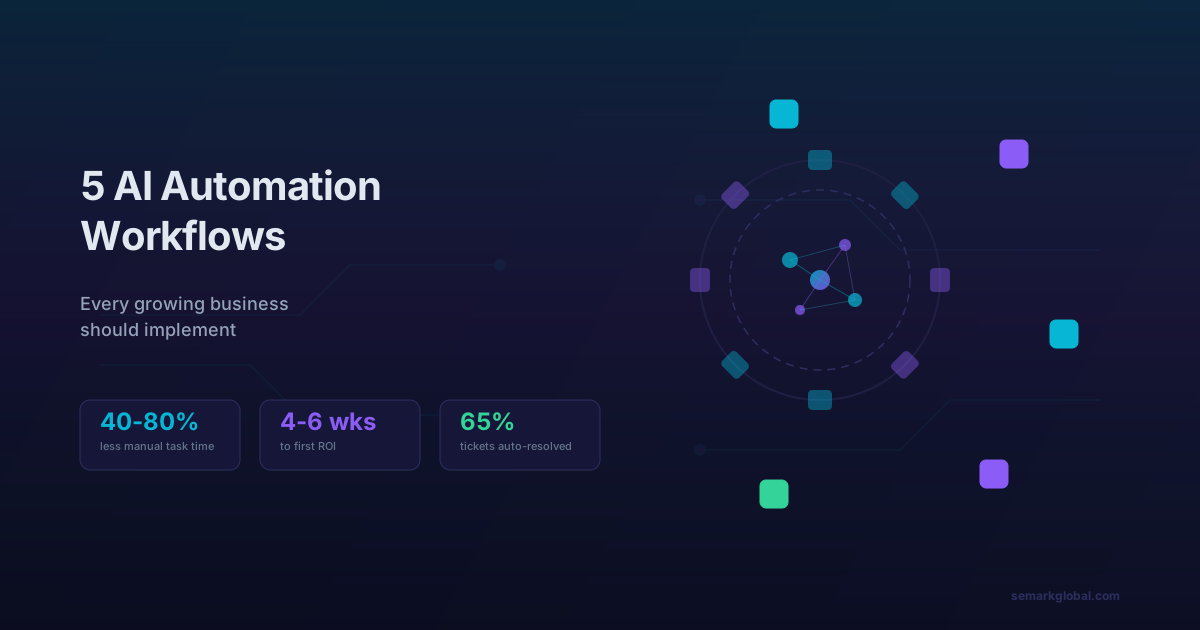
The businesses adopting AI automation today are seeing 40-80% reductions in manual task time, faster response rates, and significantly lower operational costs. The good news: you do not need a massive budget or a data science team to get started. Here are five workflows that deliver immediate, measurable ROI.
1. Customer Support Chatbot
The problem: Your support team answers the same 20-30 questions over and over. Response times suffer during peak hours, and hiring more agents is expensive.
The solution: Deploy an AI-powered chatbot that handles common queries instantly - order status, pricing questions, troubleshooting steps, return policies - and seamlessly escalates complex issues to a human agent.
How it works
Modern AI chatbots built on large language models (LLMs) go far beyond the rigid decision-tree bots of five years ago. They understand natural language, maintain conversation context, and can pull real-time data from your CRM, order management system, or knowledge base to give accurate, personalized answers.
What to expect
- 60-70% of support tickets resolved without human intervention
- Average response time drops from hours to seconds
- 24/7 availability without overtime costs
- Consistent quality - no bad days, no knowledge gaps
Getting started
Start with your top 20 most-asked questions. Feed your existing FAQ, help docs, and past ticket transcripts into the chatbot training pipeline. Launch it on your website chat widget first, then expand to email and social channels once accuracy is validated.
Real impact: A mid-size e-commerce company we worked with reduced their support team workload by 65% within the first month of deploying an AI chatbot - while their customer satisfaction scores actually improved because response times dropped from 4 hours to under 30 seconds.
2. Automated Lead Qualification and Routing
The problem: Marketing generates leads, but sales wastes time chasing unqualified prospects. Good leads go cold because they sit in a queue too long.
The solution: Use AI to score, qualify, and route incoming leads in real time based on firmographic data, behavioral signals, and engagement history.
How it works
An AI lead scoring model analyzes every incoming lead against your historical conversion data. It looks at factors like company size, industry, website behavior (pages visited, time spent, content downloaded), email engagement, and form responses to assign a probability-of-conversion score. High-scoring leads get routed immediately to your best-fit sales rep. Low-scoring leads enter an automated nurture sequence.
What to expect
- Sales team focuses only on high-probability leads
- Lead-to-opportunity conversion rates increase 20-35%
- Response time to hot leads drops from hours to minutes
- Marketing gets clear feedback on which channels produce quality leads
Getting started
You need at least 6-12 months of CRM data with closed-won and closed-lost outcomes. The model trains on your specific conversion patterns - what worked for your business, not generic benchmarks. Connect it to your CRM (Salesforce, HubSpot, Pipedrive) and marketing automation platform for seamless routing.
3. Invoice and Document Processing
The problem: Your finance team manually extracts data from invoices, receipts, purchase orders, and contracts. It is slow, error-prone, and does not scale.
The solution: Deploy an intelligent document processing (IDP) pipeline that automatically extracts, validates, and enters data from documents into your accounting or ERP system.
How it works
The system combines optical character recognition (OCR) with natural language understanding to read documents in any format - PDFs, scanned images, emails, even handwritten notes. It identifies key fields (vendor name, invoice number, line items, totals, due dates), cross-references them against your vendor database for validation, flags anomalies, and pushes clean data into your system of record.
What to expect
- 90-95% extraction accuracy out of the box, improving over time
- 80% reduction in manual data entry time
- Fewer payment errors and duplicate invoices
- Audit trail for every processed document
Getting started
Begin with a single document type - invoices are the most common starting point. Gather 200-500 sample documents to train the extraction model on your specific formats and vendors. Once invoice processing is running smoothly, expand to purchase orders, receipts, and contracts.
Real impact: Processing 500 invoices per month manually takes roughly 80 hours of staff time. With AI document processing, that drops to about 10 hours of exception handling - freeing up an entire full-time equivalent for higher-value finance work.
Want us to identify your highest-ROI automation opportunities? Get a AI automation assessment - we will map your processes and show you exactly where AI can save you the most time and money.
4. Automated Email Triage and Response Drafting
The problem: Your team spends the first hour of every day sorting through emails, deciding who should handle what, and drafting responses to routine messages.
The solution: An AI email assistant that categorizes incoming emails by intent and urgency, routes them to the right person or department, and drafts responses for routine inquiries.
How it works
The system reads every incoming email and classifies it: is this a sales inquiry, a support request, a billing question, a partnership proposal, or spam? It assesses urgency based on language cues and sender history. Routine emails get auto-drafted responses for human review and one-click send. Complex or sensitive emails are flagged and routed to the appropriate team member with a summary and suggested action.
What to expect
- Email processing time reduced by 50-60%
- Zero emails falling through the cracks
- Faster response times across all departments
- Consistent tone and professionalism in routine replies
Getting started
Start by analyzing your last 3 months of email volume. Identify the top categories and the percentage that are routine versus complex. Train the classifier on your labeled email data, set up routing rules mapped to your org structure, and begin with draft-and-review mode (human approves every AI-drafted reply) before moving to auto-send for the most predictable categories.
5. Sales Forecasting and Pipeline Analytics
The problem: Your revenue forecasts are based on gut feel and spreadsheet formulas. You cannot reliably predict which deals will close, when, or why some deals stall.
The solution: An AI-powered forecasting model that analyzes your pipeline data, deal velocity, rep activity, and historical patterns to produce accurate revenue forecasts and actionable insights.
How it works
The model ingests data from your CRM - deal stage, deal age, contact engagement, meeting frequency, email sentiment, proposal status - and compares each active deal against thousands of historical outcomes. It produces a probability-weighted forecast broken down by rep, segment, and time period. More importantly, it flags at-risk deals with specific reasons (stalled for 14 days, key stakeholder disengaged, competitor mentioned) so your team can intervene early.
What to expect
- Forecast accuracy improves from 50-60% to 85-90%
- At-risk deals identified 2-3 weeks earlier
- Sales managers spend less time on pipeline reviews, more time coaching
- Data-driven territory and quota planning
Getting started
You need clean CRM data with at least 12 months of closed deals (both won and lost). The more data points per deal (emails, calls, meetings, proposal views), the more accurate the model. Most CRM platforms offer AI forecasting add-ons, but custom models trained on your specific sales cycle consistently outperform generic solutions.
How to Prioritize These Workflows
Not every business should implement all five at once. Here is a simple framework for deciding where to start:
| Workflow | Best for | Typical ROI timeline |
|---|---|---|
| Customer Support Chatbot | High-volume support teams | 4-6 weeks |
| Lead Qualification | B2B companies with sales teams | 6-8 weeks |
| Document Processing | Finance-heavy operations | 4-6 weeks |
| Email Triage | Teams with 100+ daily emails | 3-4 weeks |
| Sales Forecasting | Companies with 50+ active deals | 8-12 weeks |
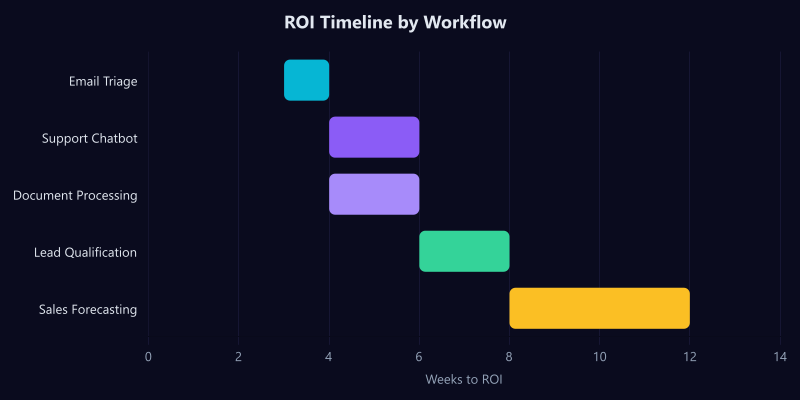
Start with the workflow where you feel the most pain. The fastest wins build internal momentum and budget for the next automation.
Common Concerns (and Honest Answers)
"Will AI replace my team?" No. AI handles the repetitive 80% so your team can focus on the strategic 20% - the work that actually requires human judgment, creativity, and relationship building.
"Is our data good enough?" Probably. You do not need perfect data to start. Most AI systems improve with use. Start with what you have, and data quality naturally improves as the system flags inconsistencies.
"What does this cost?" It varies widely, but most of these workflows pay for themselves within 2-4 months through labor savings and efficiency gains. The question is not whether you can afford AI automation - it is whether you can afford not to implement it while competitors do.
Next Steps
If any of these workflows resonated with your current challenges, the best next step is a focused assessment of your existing processes. Identify where your team spends the most time on repetitive work, quantify the cost, and evaluate which AI solution fits your stack and budget.
Get a AI automation assessment from our team - we will identify your highest-ROI automation opportunities and provide a clear implementation roadmap.
Frequently Asked Questions
What is AI automation for business? Using artificial intelligence to handle repetitive tasks like support, data entry, and scheduling automatically.
How much does AI automation cost? Basic AI tools start free. Custom automation workflows typically cost $500-$2,000 to set up.
Will AI replace my employees? No. AI handles repetitive tasks so your team can focus on higher-value strategic work.
What is the easiest AI automation to start with? Customer support chatbots offer the fastest ROI with minimal technical setup required.
Do I need a developer to implement AI? Many no-code AI tools exist, but complex workflows may benefit from professional setup.