Your website is either your best salesperson or your biggest liability. It works 24 hours a day, 7 days a week, 365 days a year. It never calls in sick, never takes a lunch break, and never asks for a raise. But unlike a bad employee, nobody is going to walk into your office and tell you when your website is driving customers straight to your competitors.
That is the tricky part. A slow, confusing, or outdated website doesn't come with a warning label. It just quietly loses you money, one visitor at a time.
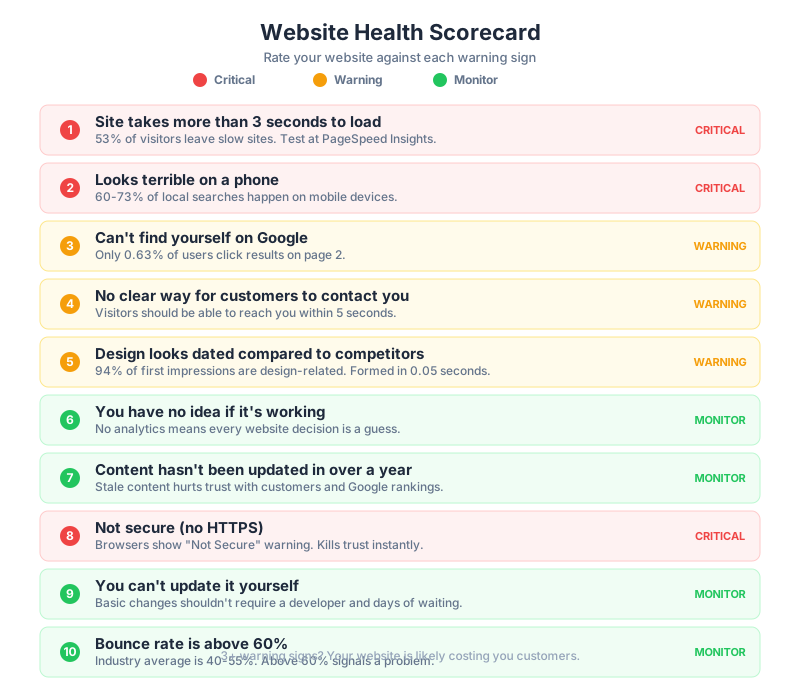
The good news? You don't need to be a tech expert to figure out if your website is helping or hurting your business. Below are 10 clear warning signs that your site is actively costing you customers, along with simple self-checks you can do right now from your phone or computer. No special tools required for most of them.
Let's walk through each one.
Sign 2: It Looks Terrible on a Phone
In 2026, somewhere between 60% and 73% of all local business searches happen on a mobile device, depending on the industry. If someone searches "emergency plumber near me" or "dentist accepting new patients," they are almost certainly doing it on their phone. And if your website is hard to use on a small screen, they will not pinch and zoom their way through it. They will tap the back button and pick the next result.
How to check this yourself: Pull out your phone right now and open your own website. Don't use the app or a saved bookmark. Google your business name and tap the result, just like a new customer would. Then ask yourself these questions:
- Can you read the text without zooming in?
- Can you tap the phone number to call directly?
- Does the navigation menu work smoothly?
- Do images load properly and look right?
- Can you fill out the contact form without it being frustrating?
Here is something many business owners don't realize: since 2019, Google has used mobile-first indexing. That means Google ranks your website based on the mobile version, not the desktop version. If your mobile site is broken or hard to use, it directly hurts your Google rankings, even for people searching on a computer.
Sign 4: There's No Clear Way for Customers to Contact You
You would be surprised how many business websites make it genuinely difficult for customers to get in touch. Think about what a potential customer wants when they land on a plumber's website at 10 PM with a burst pipe, or a restaurant's site at 6 PM trying to make a reservation. They want to take action immediately.
Here is what "easy to contact" looks like in 2026:
- Your phone number is visible on every page, ideally in the header, and it's clickable on mobile (tap-to-call).
- You have a contact form that's simple, short (name, phone, what do you need), and available on every page or in the footer at minimum.
- You offer some kind of online booking or scheduling, even if it's a simple calendar integration.
- Ideally, you have live chat or at least a chatbot that can capture leads after hours.
If your competitors offer click-to-call, online booking, and instant chat while your site has a "Contact Us" page with just an email address, you are losing leads every day. Not because your work is worse, but because they made it easier.
If any of these signs sound familiar, it might be time for a professional assessment. Request a free website audit and we will tell you exactly what is working and what is not.
Sign 6: You Have No Idea If It's Working
If you don't have Google Analytics (or any analytics tool) installed on your website, you're running your online presence completely blind. That's like running a store without a cash register. You wouldn't do that with your physical business, and you shouldn't do it with your website.
At minimum, you should know:
- How many people visit your site each month
- Where those visitors come from (Google search, social media, direct, referrals)
- Which pages they visit and for how long
- How many of them contact you, call you, or fill out a form
- What percentage leave immediately without doing anything (bounce rate)
Without data, every decision about your website is a guess. With data, you can see exactly what's working, what isn't, and where your money is going.
Sign 8: It's Not Secure (No HTTPS)
Look at your website's address in the browser. Does it start with "https://" or just "http://"? That little "s" stands for "secure," and it means your site has an SSL certificate that encrypts data between your visitors and your server.
If your site doesn't have HTTPS, modern browsers like Chrome, Firefox, and Safari will show a "Not Secure" warning right next to your URL. For a service business where customers might be entering their name, phone number, address, or payment information, that warning is devastating. It's the digital equivalent of a "Health Department Warning" sign on a restaurant door.
Google has confirmed that HTTPS is a ranking factor. Sites without it get a small but real penalty in search results.
The fix is usually simple and free. Most hosting providers offer free SSL certificates through a service called Let's Encrypt. If your hosting provider doesn't, or if they want to charge you a significant amount for it, that's a sign you might need better hosting.
How to check this yourself: Look at the address bar right now when you visit your site. You should see a padlock icon and "https://". If you see a warning triangle or the word "Not Secure," this needs to be fixed immediately.
Sign 10: Your Bounce Rate Is Above 60%
Your bounce rate is the percentage of visitors who land on your site and leave without clicking anything else. They see one page and they're gone. No second page view, no contact form, no phone call.
For service business websites, a healthy bounce rate typically sits in the 40-55% range. If yours is above 60%, something is wrong. If it's above 70%, something is very wrong.
A high bounce rate usually points to one of several problems:
- The site loads too slowly (see Sign 1)
- The design looks unprofessional or outdated (see Sign 5)
- The content doesn't match what people expected to find
- The navigation is confusing
- The site attracts the wrong audience (an SEO or ad targeting problem)
Not sure what a redesign should cost? Our honest website pricing breakdown covers every tier from DIY to custom agency builds. And if you are deciding between a template refresh and a custom build, our custom vs template comparison breaks down the real costs over 3 years.
Redesign vs. Refresh vs. Rebuild: Which Do You Actually Need?
Not every website problem requires starting from scratch. The right approach depends on how old your site is, what platform it's built on, and how severe the issues are.
Option 1: Content Refresh ($1,000 to $3,000)
This is the lightest touch. You keep your current website structure and platform, but update the visual elements and content. New colors, updated fonts, fresh photos, rewritten copy, current information.
This is right for you if: Your site is 2 to 3 years old, built on a modern platform, works on mobile, loads reasonably fast, but just looks a little tired. The foundation is solid. It just needs a fresh coat of paint.
Option 2: Redesign ($5,000 to $15,000)
A redesign means a new look and feel, improved user experience, better mobile performance, an SEO foundation, and modern features like online booking or chat. You may or may not stay on the same platform.
This is right for you if: Your site is 3 to 5 years old, or if it's newer but performing poorly on several of the checks above. The technology might be fine, but the design, structure, and optimization need significant work.
Option 3: Full Rebuild ($10,000 to $25,000)
A full rebuild means starting over. New platform, new design, new content, new everything. This is the most expensive option, but sometimes it's the only option that makes sense.
This is right for you if: Your site is more than 5 years old, built on outdated or proprietary technology, has fundamental structural problems, or is on a platform that can't support the features you need. If your developer built it on a custom PHP system from 2017 and they're no longer available, a rebuild is probably your best path forward.
Not Sure Which You Need?
A redesign is also the perfect time to fix your SEO foundation. Our technical SEO audit checklist will help you catch issues before they get baked into a new site. And once the site is live, make sure it is built to convert with our guide on turning your website into a lead generation machine.
Here's a simple way to think about it:
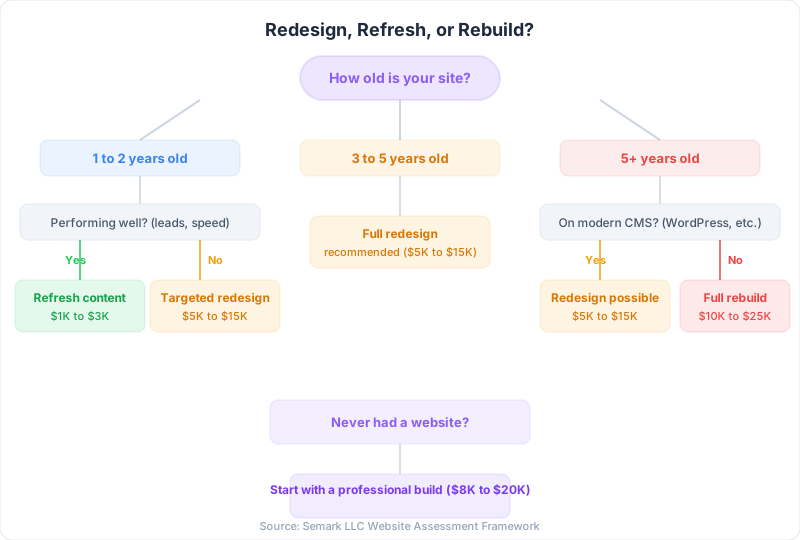
The price ranges above are general estimates for small to mid-sized service business websites. Your actual cost will depend on the number of pages, features needed, content creation requirements, and who you hire. Be cautious of anyone quoting significantly below these ranges, as very cheap websites often create more problems than they solve. Equally, be cautious of anyone quoting well above them for a standard service business site.
The Bottom Line
Your website is the first impression most potential customers have of your business. Before they call you, before they read your reviews, before they ask a friend for a recommendation, they look at your website. If it's slow, outdated, hard to use, or invisible on Google, they're going to your competitor. Not because your competitor does better work, but because their website made a better first impression.
The good news is that none of these problems are mysteries. Now you know exactly what to look for. You can test your own site in five minutes using the audit checklist above. And if you find problems, you know the general categories of solutions and what they cost.
If you went through this article and checked off three or more warning signs, it's worth having a conversation with a web professional. Not a high-pressure sales call, but an honest evaluation of where your site stands and what it would take to fix it.
Your website should be working for you around the clock. If it's not, it's working against you. And now you have the knowledge to tell the difference.
Ready to stop losing customers to a dated website? Talk to our web development team for a free redesign consultation, or see our web development services to understand what we deliver.
Frequently Asked Questions
How often should a business website be redesigned? Every 3-5 years, or sooner if performance metrics, technology, or your brand has significantly changed.
How much does a website redesign cost? Professional redesigns range from $3,000 for simple refreshes to $30,000+ for complex rebuilds.
Will a redesign hurt my SEO rankings? It can if done poorly. Proper 301 redirects and SEO migration planning prevent ranking losses.
Should I redesign or build a new website? Redesign if the structure is sound. Rebuild if the platform is outdated or functionality is limited.
How long does a website redesign take? Typically 6-12 weeks for a professional redesign, depending on scope and content readiness.