
Why Technical SEO Matters More Than Ever
You can write the best content in the world, but if your website has technical problems, Google either cannot find it, cannot understand it, or ranks it below competitors with cleaner sites.
Technical SEO is the foundation everything else sits on. Think of it as the plumbing and wiring of your house - invisible when it works, catastrophic when it does not.
This checklist covers every technical SEO factor that matters in 2026, organized by priority. Use it as a quarterly audit to keep your site healthy.
Priority 1: Crawlability and Indexing
These issues prevent Google from even seeing your pages. Fix them first.
Robots.txt
- [ ] Robots.txt exists at yourdomain.com/robots.txt
- [ ] Not accidentally blocking important pages or directories
- [ ] Sitemap URL is referenced in robots.txt
- [ ] Staging/dev environments are blocked from crawling
XML Sitemap
- [ ] Sitemap exists and is accessible (yourdomain.com/sitemap.xml)
- [ ] Submitted to Google Search Console
- [ ] Includes all important pages (and excludes non-important ones)
- [ ] No URLs returning 404 or redirect codes
- [ ] Automatically updates when new pages are added
- [ ] Less than 50,000 URLs per sitemap (split into multiple if needed)
Indexing
- [ ] Important pages are indexed (check with "site:yourdomain.com" in Google)
- [ ] No accidental "noindex" tags on pages you want ranked
- [ ] Thin or duplicate pages are set to noindex or canonicalized
- [ ] Google Search Console Index Coverage report shows no critical errors
Crawl Budget
- [ ] No infinite crawl traps (paginated URLs, filtered URLs, session IDs)
- [ ] Internal search results pages are blocked from crawling
- [ ] Parameter URLs are handled (either canonicalized or blocked)
Priority 2: Site Speed and Core Web Vitals
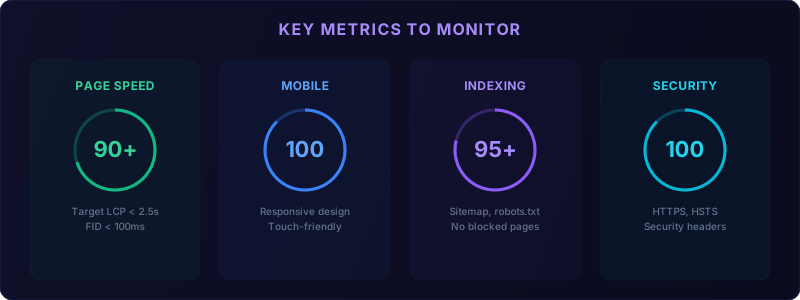
Google uses Core Web Vitals as a ranking factor. Poor performance means lower rankings and higher bounce rates.
Core Web Vitals Targets
| Metric | Good | Needs Improvement | Poor |
|---|---|---|---|
| LCP (Largest Contentful Paint) | ≤2.5s | 2.5-4.0s | >4.0s |
| INP (Interaction to Next Paint) | ≤200ms | 200-500ms | >500ms |
| CLS (Cumulative Layout Shift) | ≤0.1 | 0.1-0.25 | >0.25 |
Speed Checklist
- [ ] All Core Web Vitals passing on mobile (test at PageSpeed Insights)
- [ ] Images optimized (WebP/AVIF format, properly sized, lazy loaded)
- [ ] No render-blocking CSS or JavaScript
- [ ] CSS and JavaScript minified and compressed
- [ ] Browser caching configured (static assets cached for 1 year)
- [ ] GZIP or Brotli compression enabled
- [ ] CDN in use for static assets (Cloudflare, Vercel, etc.)
- [ ] No unnecessary third-party scripts (each one adds latency)
- [ ] Web fonts optimized (font-display: swap, subset fonts, limit font weights)
- [ ] Server response time (TTFB) under 200ms
Image Optimization
- [ ] All images served in next-gen formats (WebP or AVIF)
- [ ] Responsive images using srcset for different screen sizes
- [ ] Images lazy loaded below the fold
- [ ] Hero/above-the-fold images preloaded
- [ ] Image dimensions specified (prevents CLS)
Priority 3: Mobile Optimization
Google uses mobile-first indexing - they rank your site based on the mobile version, not desktop.
- [ ] Site is fully responsive (no horizontal scrolling on any device)
- [ ] Text is readable without zooming (minimum 16px body text)
- [ ] Tap targets are large enough (minimum 48x48px) and spaced apart
- [ ] No mobile-only pop-ups covering content (Google penalizes these)
- [ ] Navigation works well on mobile (hamburger menu, clear hierarchy)
- [ ] Forms are mobile-friendly (appropriate input types, large fields)
- [ ] Content is identical on mobile and desktop (no hidden content)
Priority 4: On-Page Technical Elements
URL Structure
- [ ] URLs are clean and descriptive (/services/seo, not /?id=47&cat=3)
- [ ] URLs use hyphens, not underscores
- [ ] No excessively long URLs (under 75 characters ideal)
- [ ] Consistent URL structure across the site
- [ ] No duplicate content at different URLs (www vs non-www, http vs https)
Canonical Tags
- [ ] Every page has a self-referencing canonical tag
- [ ] Duplicate pages point to the canonical version
- [ ] Pagination uses canonical tags correctly
- [ ] Canonical URLs are absolute, not relative
Heading Structure
- [ ] Every page has exactly one H1 tag
- [ ] H1 includes the primary keyword for that page
- [ ] Headings follow a logical hierarchy (H1 → H2 → H3, not H1 → H4)
- [ ] No headings used purely for styling (use CSS instead)
Meta Tags
- [ ] Every page has a unique title tag (under 60 characters)
- [ ] Every page has a unique meta description (under 155 characters)
- [ ] Title tags include primary keywords naturally
- [ ] Meta descriptions include a call to action
Internal Linking
- [ ] Every page is reachable within 3 clicks from the homepage
- [ ] No orphan pages (pages with no internal links pointing to them)
- [ ] Important pages have the most internal links
- [ ] Anchor text is descriptive (not "click here")
- [ ] No excessive links per page (keep under 100 internal links)
- [ ] Broken internal links are identified and fixed
Priority 5: Structured Data (Schema Markup)
Structured data helps Google understand your content and can produce rich results.
Essential Schema Types
For all business websites:
- [ ] Organization or LocalBusiness schema on the homepage
- [ ] BreadcrumbList schema on all pages
- [ ] WebSite schema with search action (if site has search)
- [ ] Article schema on all blog posts
- [ ] Author schema with name and URL
- [ ] DatePublished and DateModified
- [ ] Service schema on service pages
- [ ] FAQ schema on FAQ pages and relevant content
- [ ] Review/AggregateRating schema (if applicable)
Validation
- [ ] Test all structured data with Google's Rich Results Test
- [ ] No errors in Google Search Console Enhancement reports
- [ ] Schema is valid JSON-LD (preferred over microdata)
Priority 6: Security and HTTPS
- [ ] SSL certificate installed and valid
- [ ] All pages load over HTTPS (no mixed content)
- [ ] HTTP URLs redirect to HTTPS (301 redirect)
- [ ] HSTS header configured
- [ ] No security warnings in browser
- [ ] Regular security scans (especially for WordPress/CMS sites)
- [ ] Software and plugins up to date
Priority 7: International and Advanced
These are important for larger or international sites:
- [ ] Hreflang tags for multilingual content
- [ ] Proper pagination handling (rel=prev/next or load-more)
- [ ] 404 page returns proper 404 status code (not a soft 404)
- [ ] Custom 404 page with helpful navigation
- [ ] Redirect chains are cleaned up (A→B→C should be A→C)
- [ ] No redirect loops
- [ ] Server returns proper status codes (200, 301, 404 - not 500)
Technical issues are often symptoms of a deeper problem: an outdated website. If your site fails multiple checks on this list, it may be time for a rebuild rather than patches. See what a new website costs and custom vs template options to evaluate your options.
Tools for Your Audit
Free Tools
- Google Search Console - The most important tool. Shows indexing status, coverage errors, Core Web Vitals, and search performance.
- Google PageSpeed Insights - Tests Core Web Vitals and provides specific recommendations.
- Google Mobile-Friendly Test - Checks if pages work on mobile.
- Google Rich Results Test - Validates structured data.
- Screaming Frog (free up to 500 URLs) - Crawls your site and identifies technical issues.
Paid Tools
- Ahrefs Site Audit - Comprehensive technical audit with prioritized recommendations
- SEMrush Site Audit - Similar to Ahrefs, different UI
- Screaming Frog (paid) - Full crawl for sites over 500 pages
How to Prioritize Fixes
Here is the estimated traffic impact of common technical issues:
| Issue | Traffic Impact | Fix Difficulty | Fix Time |
|---|---|---|---|
| Important pages noindexed | Critical (-100%) | Easy | 1 hour |
| Site-wide HTTPS issues | High (-20-40%) | Medium | 1-2 days |
| Core Web Vitals failing | Medium (-10-25%) | Medium-Hard | 1-2 weeks |
| Missing XML sitemap | Medium (-10-20%) | Easy | 1 hour |
| Duplicate content / no canonicals | Medium (-15-30%) | Medium | 1-3 days |
| Broken internal links | Low-Medium (-5-15%) | Easy | 1-2 days |
| Missing meta descriptions | Low (-3-10%) | Easy | 1-2 days |
| Missing alt text on images | Low (-2-5%) | Easy | 1 day |
| Missing structured data | Low (missed opportunity) | Medium | 1-3 days |
| Render-blocking resources | Low-Medium (-5-15%) | Medium | 1 week |
Not all technical issues are equal. Here is how to prioritize:
Fix Immediately (Ranking Impact)
- Pages blocked from indexing that should be indexed
- Core Web Vitals failing on mobile
- Broken redirects or 404 errors on important pages
- Missing or incorrect canonical tags causing duplicate content
Fix This Week (Performance Impact)
- Image optimization opportunities
- Missing meta titles or descriptions
- Internal linking gaps
- Missing structured data
Fix This Month (Maintenance)
- Redirect chain cleanup
- Minor speed optimizations
- Schema additions for rich results
- Citation and NAP consistency
Want a professional to run this audit for you? Request a free technical SEO audit and we will deliver a prioritized report with exactly what to fix.
When to Do a Technical Audit
- Before any major content investment - Do not build on a broken foundation
- After a website redesign or migration - Redesigns often break SEO. Audit immediately.
- Quarterly - As a maintenance check
- When traffic drops unexpectedly - Technical issues are often the cause
The Bottom Line
Technical SEO is not glamorous, but it is the difference between content that ranks and content that sits on page five. Think of this checklist as your site's health checkup - run it quarterly, fix what is broken, and make sure your foundation is solid before investing in more content.
Need help auditing your site? Our SEO services include comprehensive technical audits as part of every engagement. Get in touch to discuss your site's health.
Frequently Asked Questions
How often should I run a technical SEO audit? Quarterly as maintenance, plus immediately after any website redesign, migration, or significant changes.
What tools do I need for a technical SEO audit? Google Search Console, PageSpeed Insights, and Screaming Frog (free up to 500 URLs) cover the essentials.
What is the most critical technical SEO issue? Pages accidentally blocked from indexing - Google cannot rank content it cannot find or crawl.
Do Core Web Vitals really affect rankings? Yes. Google confirmed Core Web Vitals as a ranking signal. Poor scores directly impact search visibility.
Can I fix technical SEO issues myself? Basic issues like meta tags and image compression, yes. Server configuration and code changes may need a developer.