You want a chatbot on your website that answers customer questions, captures leads, and books appointments. You do not want to hire a developer or learn to code. Good news: in 2026, you genuinely can set one up in under an hour.
Short answer: Choose a platform (Tidio, Chatbase, or Botpress all have free tiers), upload your business information (website URLs, FAQs, service descriptions), customize the look, and paste an embed snippet into your site. Total setup time: 30 to 60 minutes.
Which Platform to Pick
Three no-code chatbot platforms stand out for small businesses:
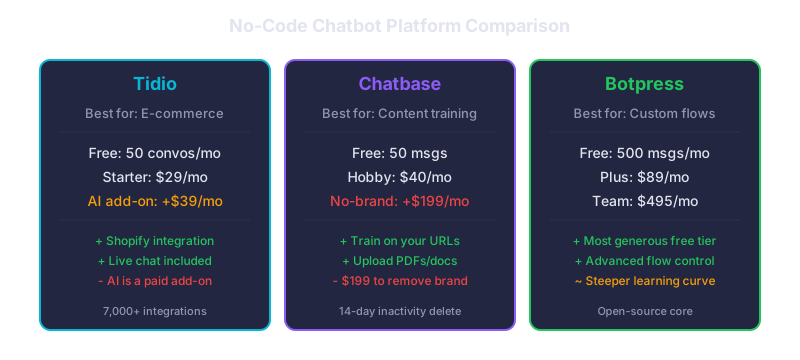
Tidio -- Free for 50 conversations per month. The Starter plan is $29 per month, and the AI add-on (Lyro) is $39 per month on top of that. Best for e-commerce and service businesses that want live chat plus AI in one tool. Integrates with Shopify, WordPress, and most website builders.
Chatbase -- Free for 50 messages (inactive accounts are deleted after 14 days). Hobby plan is $40 per month for 1,500 message credits. Best for businesses that want to train the bot on their own content. Upload PDFs, paste URLs, and the bot learns your business. Note: removing the Chatbase branding costs $199 per month extra.
Botpress -- Free for 500 messages per month. Plus plan is $89 per month. Best for businesses that want more control over conversation flows. The free tier is the most generous of the three for testing.
The Setup Process (Step by Step)
The process is broadly the same across all platforms:
- Create an account on your chosen platform (free, no credit card for trial)
- Feed it your business content -- paste your website URL, upload your FAQ document, or type out the answers to your most common questions. The AI trains on this content.
- Customize the appearance -- match your brand colors, set a welcome message, choose where the widget appears
- Set up lead capture -- configure the bot to ask for name and email before or after answering questions
- Copy the embed code -- a short JavaScript snippet, usually one line
- Paste it into your website -- in WordPress, add it to your theme header. In Shopify, paste it in theme.liquid. In Squarespace or Wix, use the code injection setting.
What Chatbots Actually Do for Small Businesses
Industry data shows chatbots handle up to 80 percent of routine customer questions. Each chatbot interaction costs $0.50 to $0.70, compared to $6 to $15 for a human agent handling the same question by phone or email. IBM estimates that businesses using chatbots can save up to 30 percent on customer service costs, and Desk365 reports an average ROI of $3.50 returned for every $1 spent.
The most common use cases for small businesses: answering hours, pricing, and service area questions instantly; capturing lead details when your team is unavailable; booking appointments through calendar integrations; and qualifying inquiries before they reach your team.
What to Watch Out For
The free tiers are useful for testing but rarely sufficient for a real business with meaningful traffic. Fifty conversations per month is about two per day. Also watch for per-interaction costs that scale: Intercom charges $0.99 per AI resolution, which adds up if your bot handles hundreds of conversations.
Start free, measure the volume for two weeks, then decide which paid tier fits your actual usage.
What This Means for Your Business
A chatbot is not a replacement for good customer service. It is a force multiplier. It handles the repetitive questions so your team can focus on conversations that close deals. If your website gets traffic but your team cannot respond to every inquiry in real time, a chatbot closes that gap for less than a dollar per conversation.
Related reads:
- Simple AI Automations Any Small Business Can Set Up Today
- Can AI Replace My Receptionist?
- Our Chatbot Development Services
Want a chatbot built for your specific business? We design and deploy custom AI chatbots that integrate with your CRM, booking system, and support workflow. Talk to our team →