

You do not need a developer or a large AI budget to start automating your business. The most impactful automations are small, specific, and cheap. And in 2026, the tools have matured enough that "no-code" actually means no code.
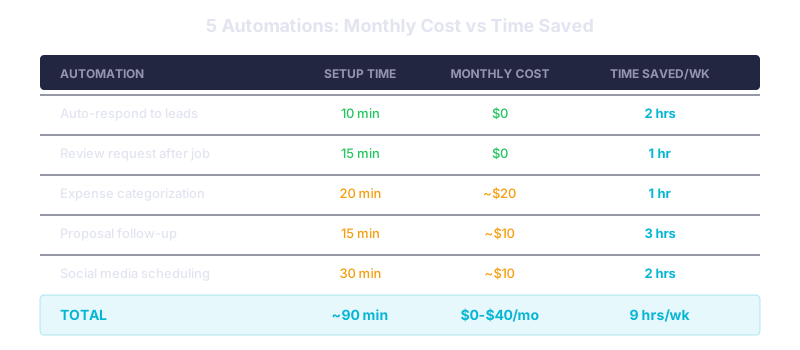
Short answer: Start with five automations that cost under $50 per month combined: auto-respond to form leads, send review requests after jobs, categorize expenses, follow up on unopened proposals, and schedule social posts. Most take under an hour to set up using Zapier or Make.
The Two Platforms You Need to Know
Zapier and Make.com (formerly Integromat) are the two dominant no-code automation platforms.
Zapier offers a free tier with 100 tasks per month and connects to over 7,000 apps. Paid plans start at $29.99 per month. Make.com offers a free tier with 1,000 operations per month and integrates with over 3,000 apps, starting at $10.59 per month for paid plans.
The cost per operation is very different: Zapier charges roughly $0.04 per task, while Make.com charges about $0.001 per operation (ActivePieces' pricing analysis). For high-volume automations, Make.com is significantly cheaper. For simplicity and app compatibility, Zapier is hard to beat.
Five Automations Worth Setting Up This Week
1. Auto-respond to new contact form leads (10 minutes to set up) When someone fills out your website contact form, trigger an immediate email confirmation with your response time and a link to book a call. Speed-to-response is one of the strongest predictors of lead conversion.
2. Post-job review requests (15 minutes to set up) After a job is marked complete in your CRM or invoicing tool, automatically send a text or email asking for a Google review. Include a direct link to your review page. This runs in the background without anyone thinking about it.
3. Expense categorization (20 minutes to set up) Forward receipt emails to a Zapier workflow that uses ChatGPT to extract the vendor name, amount, and category, then adds a row to a Google Sheet or QuickBooks. This replaces roughly an hour of bookkeeping per week for most small businesses.
4. Proposal follow-up (15 minutes to set up) If a proposal email goes unopened for 48 hours, trigger a follow-up. If it is opened but no reply comes within 72 hours, trigger a different follow-up. This automation alone can recover 10 to 20 percent of stalled deals.
5. Social media scheduling with AI captions (30 minutes to set up) Use a tool like Buffer or Later connected to ChatGPT via Zapier to draft captions from a brief prompt. You review and approve; the tool posts on schedule. Not fully hands-off, but it cuts content creation time significantly.
What to Expect in the First Month
Small businesses that implement basic automation typically see a 20 to 40 percent reduction in administrative workload within the first month (ActiveCampaign). The time savings compound: once lead response is automated, your team stops context-switching to send emails. Once review requests run automatically, your review count climbs without effort.
The total cost for all five automations above: $0 to $40 per month depending on volume. The free tiers of Zapier and Make.com cover most small business needs to start.
What This Means for Your Business
Pick the automation that addresses your biggest time drain. Set it up today. These tools are designed for non-technical users, and the free tiers give you enough room to test without financial risk. Start with one, prove it works, then add the next.
Related reads:
Need help designing automations for your specific workflow? We build custom automation systems that connect your tools and eliminate manual busywork. Talk to our team →