
Seventy-five percent of accounts payable departments now use some form of AI, yet even the best-run teams still send about 9% of invoices to a human for review (Ardent Partners, AP Metrics That Matter 2025). So the honest answer to "does it actually work?" is: yes, mostly - and the 9% is exactly what you need to plan around before you sign anything.
Short answer: AI invoice and document processing works well today for standard, machine-printed documents like invoices, receipts, and forms - the software cost is roughly a penny per page (Google Cloud and AWS pricing, 2026), and it can cut invoice cycle times from weeks to days. It does not work as a fully hands-off, 100%-accurate replacement for people. The realistic outcome is a system that handles the routine majority automatically and routes the messy minority to a human, which is still a large win for most businesses.
What "Automated Document Processing" Actually Means
Strip away the jargon and there are three layers doing the work, usually stacked together in what vendors call Intelligent Document Processing (IDP):
- OCR (optical character recognition) turns the pixels of a scanned invoice or PDF into machine-readable text. This is the mature, cheap part.
- Extraction figures out which text is the invoice number, which is the total, which is the vendor, and which is a line item. This is where AI earns its keep, because it has to understand layout and context, not just read letters.
- Validation and routing checks the extracted data against your rules (does the total match the purchase order? is this vendor approved?) and either passes it straight through to your accounting system or flags it for a person.
Does It Actually Work? The Honest Accuracy Picture
Here is the number that tells the real story. In Ardent Partners' 2025 benchmark, top-performing AP teams still had a 9% invoice exception rate, while the industry average sat at 22% (Ardent Partners, AP Metrics That Matter 2025). An "exception" is any invoice the automated flow could not clear on its own - a mismatch, a missing field, a duplicate, a new vendor. Even the best automated pipelines in the world kick roughly one invoice in eleven back to a person.
That is not a failure of the technology; it is the shape of the technology. Modern extraction is genuinely good on clean, structured documents and genuinely unreliable on the long tail of edge cases. Andrew Ng, the AI researcher whose company LandingAI builds document-intelligence models, put the leap plainly: "AI can now process unstructured information in a way not possible 2 years ago" (Forbes, September 2025). In the same interview he argued against expecting one model to do everything - "We're past the era of one-size-fits-all models" - which is a useful warning for buyers: the systems that work are specialized for the document type, not generic.
So when a vendor demo shows 99% accuracy, ask a sharper question: accuracy on what? A batch of identical, machine-printed invoices from your top five suppliers will score near-perfectly. A pile of crumpled handwritten receipts, faxed delivery notes, and PDFs someone photographed on a phone will not. Your real-world accuracy is a blend, and the exception rate - not the headline accuracy - is the metric that determines how much human time you actually save.
What It Actually Costs
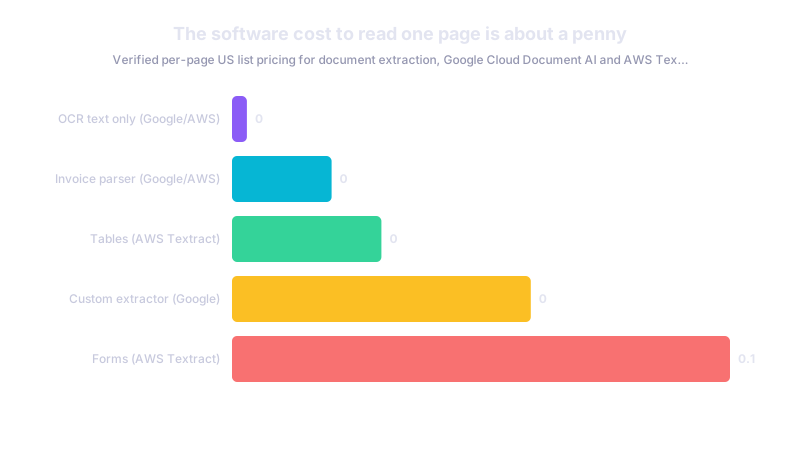
The software itself is cheap and getting cheaper. On live vendor pricing pages checked in 2026, the pretrained invoice extractors from the two biggest cloud providers both land at about one cent per page: Google Cloud's Document AI Invoice Parser is priced at $0.10 per 10 pages, and AWS Textract's Analyze Expense API is $0.01 per page ($10 per 1,000 pages) (Google Cloud; AWS, 2026). Plain OCR with no structured extraction is cheaper still - around $0.0015 per page on both platforms. If you need a custom extractor trained on your own unusual document type, Google's Custom Extractor runs $30 per 1,000 pages (three cents a page); AWS's Forms extraction is $0.05 per page.
At those rates, the per-document API cost is almost never the deciding factor. A business processing 2,000 invoices a month is looking at $20-60 a month in raw extraction fees. The real budget line is everything around the model:
- Integration with your accounting or ERP system, so cleared invoices actually post without re-keying.
- Rules and validation setup - matching to purchase orders, approval thresholds, duplicate detection.
- The human review queue for that 9-22% of exceptions, which still needs a person and a workflow.
- Ongoing tuning as new vendors and formats show up.
If you are weighing this against simply hiring another clerk, we walk through that decision in AI vs. hiring an employee: when to automate and when to hire.
Where the ROI Really Shows Up (and Where It Doesn't)
Set expectations correctly and you will be happy; set them wrong and you will feel misled. Document automation is an efficiency play, not a revenue play. In Deloitte's early-2026 enterprise survey of 3,235 leaders, 66% reported measurable efficiency or productivity gains from AI, but only 20% said AI was already growing revenue - even though 74% hoped it would (Deloitte, State of AI in the Enterprise, 2026).
For invoice and document work, that maps cleanly. You will save staff hours, shorten cycle times, reduce late payments, and cut re-keying errors. You will probably not "grow the business" directly from processing paperwork faster - you will free people to do the work that does. That is still a strong return, but it belongs in the "reduce cost and friction" column of your plan, not the "new sales" column.
Buy the Boring Parts, Don't Build Them
There is a strong temptation, especially once someone on the team gets excited, to build a custom document-AI system from scratch. For most invoice and standard-document use cases, resist it. Even at the enterprise level - where budgets and engineering teams are large - the market has moved decisively toward buying: 76% of enterprise AI use cases in 2025 were purchased from vendors rather than built in-house, up from roughly half a year earlier (Menlo Ventures, State of Generative AI in the Enterprise, 2025).
Invoice extraction is one of the most commoditized, well-solved document tasks in existence. The pretrained parsers above already know what an invoice looks like. Building your own is worth it only when your documents are genuinely unusual - a niche industry form, a proprietary layout no vendor supports - and even then, start by testing whether a customizable off-the-shelf extractor gets you 90% of the way. A sobering data point on the build path: a widely cited (and self-described preliminary, non-peer-reviewed) 2025 MIT report found that general-purpose and vendor tools reached production far more often than custom, internally built ones (MIT NANDA, State of AI in Business 2025). Off-the-shelf document parsers are on the easier side of that line. Custom builds are on the harder side.
Be equally skeptical of "AI agent" branding on document tools. Despite the marketing, only about 16% of enterprise AI deployments in late 2025 were genuinely agentic rather than simpler automation (Menlo Ventures, 2025). A reliable, well-scoped invoice pipeline does not need to be an "agent" to be valuable - and a plain, boring workflow is usually easier to trust with your money. If you want the real distinction, see what AI agents are and how small businesses can actually use them.
Where It Still Breaks
Know the failure modes before you commit, because they are predictable:
- Handwriting and poor scans. Machine-printed invoices are the sweet spot. Handwritten notes, faded thermal receipts, and phone photos at an angle push exception rates up fast.
- Non-standard and changing layouts. A vendor who redesigns their invoice, or a new supplier with an unusual format, will generate errors until the system adapts.
- Judgment calls. Disputed charges, unusual line items, high-value payments, and anything touching compliance should route to a human by design, not by accident.
- Garbage in. The system is only as good as the source document and your master data. Bad vendor records produce bad matches no matter how good the extraction is.
What This Means for Your Business
If your team spends real hours keying invoices, receipts, delivery notes, or intake forms, automated document processing almost certainly pays for itself - not because it is perfect, but because it clears the routine majority for pennies a page and shortens cycle times from weeks to days. The mistake to avoid is expecting 100% hands-off accuracy. Plan instead for a system that automates most of the work and routes a sensible minority to a person.
A practical path for a small or mid-market operator:
- Pick one high-volume, high-standardization document - usually supplier invoices - and ignore the rest at first.
- Buy, don't build. Test a pretrained parser from an established vendor against a real sample of your own documents and measure the exception rate on your data, not the demo's.
- Wire it into your accounting system so cleared items post automatically; a system that still requires re-keying saves far less.
- Design the review queue for exceptions and track that rate monthly - falling exceptions are the truest sign it is working.
- Judge it on efficiency, not revenue, and expand to the next document type once the first is stable.
Want an honest assessment of whether your specific document workflow is a good automation candidate - including a realistic exception-rate estimate on your own paperwork? Talk to us about our AI and machine learning services, or get in touch and we will tell you plainly whether it is worth doing.