AI Isn't Just for Big Companies Anymore
Three years ago, AI tools required a dedicated IT team, a six-figure budget, and months of implementation. In 2026, a restaurant owner in Denver can set up an AI-powered reservation and review management system in an afternoon. A solo real estate agent can automate lead follow-up emails that sound like they were written personally. A small law firm can cut document review time by 60% without hiring a single new associate.
The shift is real, and it is happening fast. Small businesses adopting AI tools consistently report measurable productivity improvements within the first few months of use. The tools have become affordable, intuitive, and industry-specific.
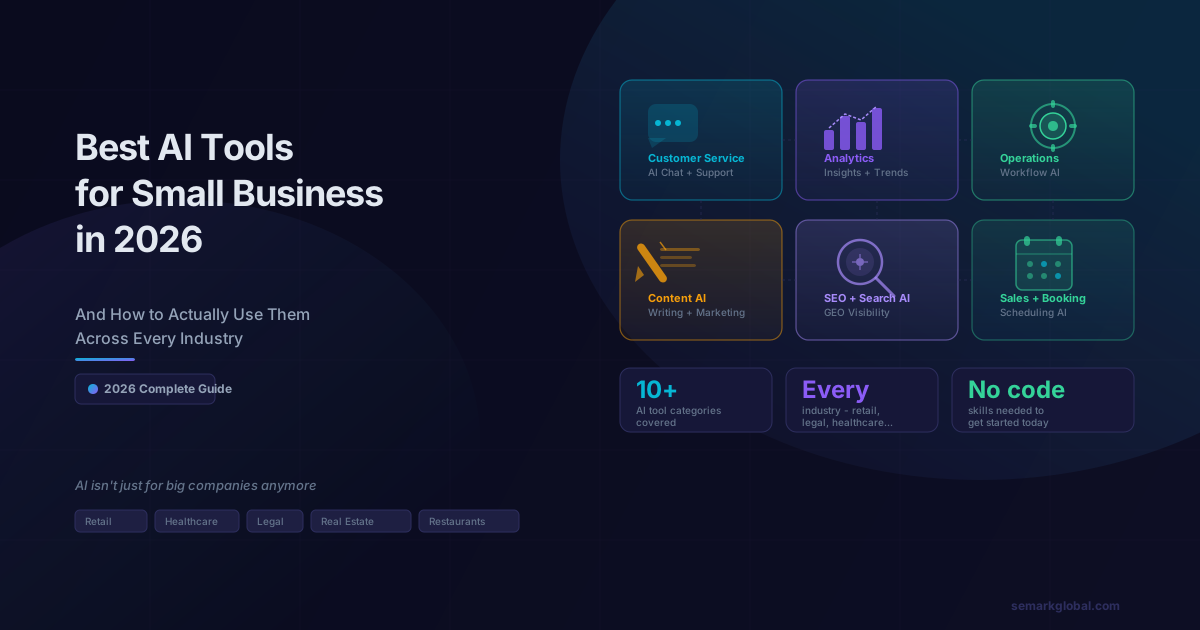
This guide covers the best AI tools across every major business function, which industries benefit most from each category, and exactly how to get started without a technical background.
What "Affordable" Actually Means in 2026
Before diving into specific tools, one point deserves emphasis: AI tools in 2026 are not defined by their price tags. The value they deliver is the story.
A $50/month AI content tool that produces 20 high-quality blog posts per month replaces thousands of dollars in freelance writing costs. A $99/month AI scheduling assistant that handles inbound booking requests around the clock is the equivalent of a part-time receptionist. When evaluating any AI tool, the right question is never "How much does it cost?" - it is "What does this replace, and what does it enable?"
Across the tools in this guide, most fit comfortably into small business budgets and pay for themselves quickly through time savings, error reduction, and revenue generation.
Category 1: Marketing and Content AI Tools
What they do
Marketing and content AI tools help businesses create, schedule, optimize, and distribute content across websites, social media, email, and advertising platforms. They dramatically compress the time required to produce professional-quality copy, images, and campaigns.
The value they add
The average small business owner spends 6+ hours per week on marketing content creation. AI tools cut this to under 2 hours while increasing output volume and consistency. For industries where trust and expertise drive purchasing decisions - legal, healthcare, financial services - consistent, high-quality content is a competitive differentiator that most small businesses previously could not afford to maintain.
Top tools in this category
| Tool | Best For | Key Capability |
|---|---|---|
| Jasper AI | Long-form content, blog posts, ad copy | Brand voice training, SEO integration |
| Copy.ai | Short-form copy, email sequences, social posts | Workflow automation for content pipelines |
| Canva AI | Visual content, social graphics, presentations | Design generation from text prompts |
| Lately AI | Social media repurposing | Turns long content into dozens of social posts |
| Surfer SEO + AI | SEO-optimized blog writing | Real-time content scoring against top SERP results |
Industries that benefit most
- Restaurants and food service - AI tools generate weekly specials posts, seasonal menu descriptions, and Google Business Profile updates in minutes
- Real estate - Property listing descriptions, neighborhood guides, and market update newsletters
- Healthcare and wellness - Patient education content, appointment reminder emails, seasonal health campaigns
- Retail and e-commerce - Product descriptions at scale, promotional campaign copy, abandoned cart email sequences
Struggling to keep up with content demands? Talk to our team about building an AI-powered content system for your business.
If you are investing in content AI tools, pairing them with a solid SEO strategy maximizes their impact. For more on what content signals actually move the needle in 2026, see our guide to SEO in 2026.
Category 2: Customer Service and Chatbot AI
What they do
Customer service AI tools handle inbound inquiries, qualify leads, answer frequently asked questions, book appointments, and route complex issues to human staff - 24 hours a day, 7 days a week.
The value they add
The average small business loses 35-40% of potential leads that contact them outside business hours. AI chatbots and virtual assistants capture those inquiries, provide immediate responses, and hand off warm leads to the sales team during business hours. For service businesses where response speed is a purchase trigger - HVAC, plumbing, legal, dental - the revenue impact of never missing an inquiry is substantial.
Top tools in this category
| Tool | Best For | Key Capability |
|---|---|---|
| Intercom AI (Fin) | SaaS and service businesses | Resolves 60%+ of support tickets without human intervention |
| Tidio | E-commerce and retail | Live chat + AI hybrid, abandoned cart recovery |
| Drift | B2B lead qualification | Conversational marketing and meeting booking |
| ManyChat | Social media DM automation | Instagram, WhatsApp, and Facebook Messenger AI |
| Zendesk AI | Multi-channel support | Ticket triage, sentiment analysis, agent assist |
Industries that benefit most
- Dental and medical practices - AI handles appointment scheduling, insurance FAQs, and post-visit follow-ups
- Law firms - Initial intake qualification, document request automation, billing inquiry responses
- Home services (HVAC, plumbing, landscaping) - After-hours booking, job estimate requests, service reminders
- Restaurants - Reservation management, menu questions, catering inquiry qualification
Category 3: Operations and Workflow Automation AI
What they do
Operations AI tools automate repetitive internal processes - data entry, invoice processing, scheduling, inventory management, HR workflows, and cross-platform data synchronization. They connect the software tools a business already uses and eliminate manual handoffs between them.
The value they add
Most small businesses run on 5-10 different software platforms (CRM, accounting, email, scheduling, POS, etc.) that do not communicate with each other. Operations AI tools - particularly workflow automation platforms - bridge these gaps and eliminate the manual data entry that consumes hours of staff time every week. A dental practice that automated its patient record updates, billing triggers, and appointment confirmations across three platforms reclaimed 14 hours of administrative time per week.
Top tools in this category
| Tool | Best For | Key Capability |
|---|---|---|
| Zapier AI | Cross-app workflow automation | 6,000+ app integrations, AI-powered workflow builder |
| Make (Integromat) | Complex multi-step automations | Visual workflow editor, error handling |
| Monday.com AI | Project and team management | Task automation, resource planning, status updates |
| Notion AI | Knowledge management and SOPs | Document drafting, database summaries, meeting notes |
| Clockify AI | Time tracking and billing | Automatic time entry suggestions, invoice generation |
Industries that benefit most
- Professional services (accounting, consulting, marketing agencies) - Client onboarding automation, report generation, invoice workflows
- Healthcare - HIPAA-compliant scheduling automation, patient record synchronization, referral management
- Construction and trades - Job scheduling, material ordering triggers, subcontractor communication workflows
- Retail - Inventory reorder automation, supplier communication, sales data synchronization
Category 4: Sales and CRM AI
What they do
Sales AI tools enhance every stage of the sales process: prospecting, lead scoring, email personalization, follow-up sequencing, pipeline forecasting, and deal coaching. CRM AI tools analyze customer data to surface actionable insights and automate repetitive sales tasks.
The value they add
The average sales rep spends only 28% of their time actually selling. The rest goes to data entry, email drafting, scheduling, and administrative tasks. AI tools in this category reclaim that time and redirect it to high-value selling activities. For small businesses without dedicated sales teams, AI-powered CRM tools allow a single business owner or part-time salesperson to operate with the systematic discipline of a full sales organization.
Top tools in this category
| Tool | Best For | Key Capability |
|---|---|---|
| HubSpot AI | All-in-one CRM + marketing | Lead scoring, email personalization, deal forecasting |
| Salesforce Einstein | Larger small businesses | Predictive analytics, opportunity insights, auto-logging |
| Apollo.io | B2B prospecting | AI-powered contact finding, email sequencing |
| Lavender | Email personalization | Real-time AI coaching for sales emails |
| Gong.io | Sales call analysis | Records, transcribes, and coaches based on sales calls |
Industries that benefit most
- Real estate - Automated lead nurturing, market report personalization, showing schedule optimization
- Financial services - Prospect research, proposal personalization, compliance-aware communication drafting
- B2B service businesses - Pipeline visibility, follow-up automation, deal stage guidance
- Insurance - Policy renewal reminders, cross-sell identification, claims status communication
Not sure which AI tools are right for your industry? Get a AI readiness assessment from our team - we'll map the right tools to your specific workflow.
Category 5: Analytics and Business Intelligence AI
What they do
Analytics AI tools synthesize data from multiple sources - sales, marketing, operations, finance - and surface insights, trends, and anomalies that would take human analysts hours to identify. They translate raw data into plain-language recommendations and visual dashboards accessible to non-technical business owners.
The value they add
Small businesses historically lacked access to the business intelligence capabilities that enterprise companies use to make strategic decisions. AI-powered analytics tools democratize this capability. A boutique retailer can now get the same inventory trend analysis that a national chain runs, without a data science team. A restaurant group can identify which menu items and time slots drive the most profitable table turns without running a single manual report.
Top tools in this category
| Tool | Best For | Key Capability |
|---|---|---|
| Looker Studio (with AI) | Marketing and web analytics | AI-assisted report creation, anomaly detection |
| Tableau AI | Business data visualization | Natural language queries, trend forecasting |
| Pecan AI | Predictive analytics for non-data teams | Revenue forecasting, churn prediction, demand planning |
| Klipfolio | KPI dashboards | Multi-source data aggregation, automated alerts |
| Semrush AI | SEO and competitive analytics | Market trend analysis, content gap identification |
Industries that benefit most
- E-commerce and retail - Sales trend forecasting, inventory optimization, customer lifetime value analysis
- Hospitality and restaurants - Demand forecasting, pricing optimization, labor scheduling based on traffic predictions
- Healthcare - Patient volume forecasting, revenue cycle analysis, no-show prediction
- Professional services - Profitability by client/project, capacity utilization, business development pipeline metrics
Category 6: AI-Powered Marketing Visibility Tools
As AI-powered search engines reshape how customers find businesses, tools that optimize your visibility in AI-generated answers have become essential marketing infrastructure. This is not traditional SEO - it is a new discipline called Generative Engine Optimization (GEO).
For a complete breakdown of how to get your business cited by ChatGPT, Perplexity, and Google AI Overviews, see our guide on GEO: how small businesses get found by AI search. The tools and strategies in that article complement every category covered here.
AI marketing tools also extend to social media and digital advertising. For a strategy-level view of how AI integrates into a complete digital marketing system, our guide to digital and social media marketing strategy that drives real business growth provides the framework.
And if you want to understand how AI agents - the next evolution beyond individual tools - can run complex multi-step business processes autonomously, our overview of what AI agents are and how small businesses can use them in 2026 explains the distinction clearly.
Industry Spotlights: AI Tools in Action
The Restaurant Using AI for Everything Front-of-House
A mid-sized restaurant group with four locations implemented AI tools across three functions in early 2025:
- Reservations and waitlist management - An AI assistant handles inbound reservation requests via text, phone call transcription, and web chat. It manages the waitlist in real time, sends automated table-ready notifications, and flags potential no-shows 2 hours before their reservation based on historical patterns.
- Review response automation - AI drafts personalized responses to every Google and Yelp review within 2 hours of posting. A manager approves with one click or edits before publishing. Response time went from 4-5 days to under 3 hours.
- Weekly specials content - The marketing team uses AI to generate social media posts, email newsletters, and Google Business Profile updates for each week's specials in under 20 minutes.
The Law Firm That Cut Document Review Time by 60%
A boutique employment law firm with 8 attorneys implemented AI for document review and client intake:
- Document analysis - AI tools review employment contracts, identify non-standard clauses, and generate a summary memo flagging areas of concern. Work that previously took a junior associate 3-4 hours takes the AI under 20 minutes, with the associate reviewing the output in 30 minutes.
- Client intake automation - A conversational AI handles the initial intake questionnaire, gathers case background, and populates the firm's CRM with structured case data before the first attorney consultation.
- Legal research drafts - AI generates first-draft research memos on common legal questions, which attorneys review and verify before sending to clients.
The Real Estate Agent Who Doubled Her Lead Follow-Up
A solo real estate agent in a competitive suburban market implemented AI tools for lead management:
- Personalized follow-up sequences - AI generates individualized follow-up emails for every lead based on the properties they viewed, their stated timeline, and their neighborhood preferences. Each email reads as personally written.
- Market report automation - Monthly neighborhood market reports are auto-generated for every client in her database, keeping her top-of-mind without consuming weekend hours.
- Social content pipeline - AI generates 3-4 social posts per week using local market data, property spotlights, and buyer tips. She reviews and posts in under 10 minutes weekly.
The Healthcare Clinic That Reduced No-Shows by 35%
A physical therapy clinic with two locations was struggling with a 28% no-show rate that was eroding revenue:
- AI-powered appointment reminders - Multi-touch reminder sequences go out via SMS, email, and phone call at 72 hours, 24 hours, and 2 hours before each appointment, each personalized to the patient's name, therapist, and appointment type.
- Waitlist management - When a cancellation occurs, AI immediately contacts the waitlist in priority order and books the slot automatically.
- Post-visit follow-up - Automated check-ins at 24 hours and 7 days post-appointment collect satisfaction feedback and prompt return visit scheduling.
How to Get Started: You Don't Need Technical Skills
The most common reason small businesses delay AI adoption is the assumption that implementation requires technical expertise. In 2026, this assumption is simply false for the majority of AI tools on the market.
Here is a realistic getting-started framework for any small business:
Step 1: Identify your highest-friction tasks (Week 1)
Write down every task your business performs that is:
- Repetitive and rule-based (the same steps every time)
- Time-consuming relative to the value it adds
- Prone to human error or inconsistency
- Keeping you or your team from higher-value work
Step 2: Match one task to one tool (Week 2)
Start with a single tool that addresses your highest-friction task. Do not try to implement five tools simultaneously. Successful AI adoption follows a crawl-walk-run pattern: one tool, fully adopted, before adding the next.
Most AI tools offer free trials of 14-30 days. Use this period to implement and measure before committing to payment.
Step 3: Measure the time and output difference (Weeks 3-4)
Track two metrics during your trial:
- Time saved per week on the automated task
- Output quality compared to your previous process (more consistent? higher volume? fewer errors?)
Step 4: Expand systematically (Month 2+)
Once your first tool is running smoothly, identify the next highest-friction task and repeat the process. Within 3-6 months, most small businesses can have 3-5 AI tools working together to form a genuine efficiency system.
Comparing AI Tools: What to Look for Before You Commit
Not all AI tools deliver equal value. Use this framework to evaluate any tool before committing:
| Evaluation Factor | What to Look For |
|---|---|
| Ease of setup | Can a non-technical person configure it in under 2 hours? |
| Integration with existing tools | Does it connect to your CRM, email, calendar, or POS? |
| Customization depth | Can you train it on your brand voice, products, or specific workflows? |
| Data privacy | Where is your data stored? Is it used to train the vendor's models? |
| Support quality | Is onboarding support included? Is there a knowledge base? |
| Output quality | Does the AI output require significant human editing, or is it production-ready? |
| Pricing model | Is pricing per seat, per usage, or flat monthly? Which scales better with your business? |
Frequently Asked Questions
Are AI tools safe for small business data? Reputable AI tools use encryption and privacy controls, but always review data policies before uploading sensitive information.
What is the best free AI tool for small business? ChatGPT's free tier handles content drafting, brainstorming, customer response templates, and basic analysis.
Do I need technical skills to use AI tools? No. Most modern AI tools are designed for non-technical users with simple interfaces and templates.
How much do AI tools cost per month? Most small business AI tools range from free to $100/month. Enterprise features can cost $200-$500.
Will AI tools replace my staff? No. AI tools augment your team by automating repetitive work so staff focus on higher-value tasks.